
hi guys,
For those who are interested in buying GPS devices, we do carry Garmin and Tomtom Brands, we're based here in the Phils. If you do have some questions about this products, just PM me or txt me at 0916-236-3000...
sori mods OT...

The Largest Car Forum in the Philippines
- Forums
- Discussions
- Events
- Community
Results 221 to 240 of 758
-

 Verified Tsikot Member

- Join Date
- May 2008
- Posts
- 6
July 1st, 2008 02:58 AM #221
-
Tsikot Member
- Join Date
- Jun 2008
- Posts
- 2
July 1st, 2008 03:40 AM #222 Originally Posted by StraightSix

Thank you so much for that amazing post! It helped me tremendously. At first I was a bit confused but I manged to figure it out.. To help others who in the future have the same problem I have created a zip file with 3 folders in it. All you have to do is copy it to your SD card and your good to go! I have uploaded it here http://www.filedropper.com/garmingps...mphilipenesmap for your convenience.
-
 Tsikot Member Rank 3
- Join Date
- Sep 2005
- Posts
- 1,218
July 1st, 2008 06:36 AM #223I have to admit that it is confusing ... I was subtly trying to make people read earlier posts. I hope you didn't mind. :evillaugh Originally Posted by amieman
If you're selling Tomtom's in the Philippines, does that mean you've got a Tomtom-compatible Philippine map? Originally Posted by -> zki <-
-
 Tsikot Member
- Join Date
- May 2008
- Posts
- 2
July 18th, 2008 03:21 PM #224Hello po mga sir... Meron po ba dyan sa inyo naka tomtom, pwede ba makahingi nang map nang philippines? willing po to pay... please text... 09153167717... dpo ko madalas mag online dito, pakitext naman po your offers... need ko lang yung pbl file nang map... blank kasi map ko dito eh, alang mga street or roads man lang... thanks po... waiting for your offers...

-
Verified Tsikot Member
- Join Date
- Jul 2008
- Posts
- 42
July 22nd, 2008 01:34 PM #225I just bought a Blaupunkt Travel Pilot 5.2 mobile navigation (w/ Windows CE 5.0 core OS) which I'm using now here in South Korea. Does anybody know about this brand? Any idea if it can be use in the Philippines? tnx.
-
 Tsikot Member Rank 3
- Join Date
- Apr 2006
- Posts
- 894
July 23rd, 2008 09:46 PM #226kuya S/S -- oo daw according to his post in another forum. Originally Posted by StraightSix
And there are 2 (versions) of Ph GPS maps available for the Garmin... just can't remember the site though...I'm quite sure it's not waypoints.ph...Last edited by B2Bomber; July 23rd, 2008 at 10:12 PM.
-
Tsikot Member Rank 3
- Join Date
- Apr 2006
- Posts
- 894
July 23rd, 2008 10:19 PM #227I'm not familiar, but if it gets position straight from the GPS satellites and you've got a Philippine map, it oughta work. hth. Originally Posted by rosenverd
-
Tsikot Member Rank 3
- Join Date
- Sep 2005
- Posts
- 1,218
July 24th, 2008 05:05 AM #228That's great. One more device with a working Phil. map (Tomtom) should boost the number of users even more. Originally Posted by B2Bomber
Could it be the one from Carlos H. Lopez (with the same username)? I have his free map on my pc, too. Originally Posted by B2Bomber
Regarding the brand, Blaupunkt has been in the GPS business for quite some time, though not as popular as the others. Unlike the US, there's a multitude of GPS navigation companies here in Europe ... bakbakan talaga sa market. Even Garmin wasn't that popular until they introduced their cheaper PNA's. I remember Blaupunkt's GPS products then being in-dash ... integral to the car's HU and with a disc-based map. With the bulk of sales being PNA's -small, portable units - it's only natural for them to make one too, to stay in the market IMO. Originally Posted by rosenverd
---
As for the Travel Pilot, I'm not familiar with it. If Blaupunkt doesn't have a Philippine map you might just have to wait until it comes up with one.
OR
You might want to inquire about the Philippine map that works on Tomtom, as posted by zki ... and google on how to run the Tomtom navigation software on your Travel Pilot.
It maybe possible ... because I was able to run Tomtom Navigator on my Navman ICN510 PNA (which is actually a Mio PDA on WinCE).
OR
Try installing Garmin Mobile XT for WinMobile. I don't have the slightest idea on compatibility issues between WinCE and WinMobile, so do so at your own risk. I was, however, able to run Garmin Mobile XT for Symbian on a Nokia phone with an older OS than the required version.
Once you get GMXT working, you're home free.Last edited by StraightSix; July 24th, 2008 at 05:23 AM. Reason: Additional Info
-
Tsikot Member Rank 3
- Join Date
- Apr 2006
- Posts
- 894
July 24th, 2008 09:50 PM #229Hehe. Di rin ako familiar kuya. ngayon ngayon pa lang ako nagtitingintingin sa mga topics regarding Navigation as an enthusiast/hobbyist... para naman di nakakahiyang sa positioning/navigation tayo pos wala tayong kaalam-alam sa nav scene sa homeland. hehe. Originally Posted by StraightSix
actually, nahanap ko yung link sa favorites dito sa net pc namin, pero di ko na maload. anyway, nadownload ko naman yung 2 downloadables nila e. yung isa e alleged tried and tested na pang-garmin, yung isa beta test na pang-garmin. gusto mo swap tayo nung map mo? hehe. medyo malaki-laki nga lang 'tong mga file, <10mb yung pinakamalaki.
speaking of phone navs, any idea which bluetooth capable gps receiver (apart from Nokia's) can the E90 work with? TIA.
-
 Verified Tsikot Member
- Join Date
- May 2004
- Posts
- 227
July 27th, 2008 09:41 AM #230sir san yung supplier sa philippines? may contact number ba kayo nung supplier? Originally Posted by PasigGuy
wala akong kilala taga taiwan na puedeng pabili ng garmin e
saka how bout the waypoints maps? san niloload after downloading sa pc?
sdcard?
-
Tsikot Member Rank 3
- Join Date
- Apr 2006
- Posts
- 894
July 27th, 2008 10:12 PM #231as mentioned earlier, check Garmin's site. Originally Posted by dennisdko
Hope this helps.
I think unit-dependent ang "add map" procedure. so, better if you've got the unit na muna and then refer to the manual siguro. may post na dito somewhere regarding using the SD card. try to do a search. Originally Posted by dennisdko
.02 hth.
-
 Tsikoteer
- Join Date
- Mar 2006
- Posts
- 1,577
July 28th, 2008 07:08 PM #232Just wondering, suppose I have one of this China 2-DIN touchscreen audio unit for my car with GPS capability, and I only see one connector for the GPS (not sure if its for the antenna or for an external device). Does anyone have a clue to what I need to buy?
Kasi most GPS units have lcd screens eh, I was hoping na kung yung headunit ang lalagyan ng gps, edi meaning to say yung headunit na mismo ang magdidisplay nun. Tama ba?
-
Tsikoteer
- Join Date
- Mar 2006
- Posts
- 1,577
July 28th, 2008 07:08 PM #233Just wondering, suppose I have one of this China 2-DIN touchscreen audio unit for my car with GPS capability, and I only see one connector for the GPS (not sure if its for the antenna or for an external device). Does anyone have a clue to what I need to buy?
Kasi most GPS units have lcd screens eh, I was hoping na kung yung headunit ang lalagyan ng gps, edi meaning to say yung headunit na mismo ang magdidisplay nun. Tama ba?
-
Tsikot Member Rank 3
- Join Date
- Apr 2006
- Posts
- 894
July 28th, 2008 09:20 PM #234IMO -- KUNG may video out yung gps unit mo (na walang LCD) at kaya ito tanggapin ng AV HU mo, wala akong nakikitang prob dito.
parang yung mga Nok phone na may map capability pero walang builtin gps receiver. as long as may compatible gps receiver ka, then magagamit mo yung Nok phone mo na may map.
now, I'm not sure if I understood your question/post correctly, you say your HU HAS GPS capability, what specifically do you mean by its GPS capability? with regards to the connectors, check your manuals.
.02 hth.
-
Tsikot Member Rank 3
- Join Date
- Sep 2005
- Posts
- 1,218
July 28th, 2008 10:29 PM #235Kung may GPS yung headunit, dun na sa built-in monitor niya ang display ng GPS map/navigation, pareho lang sa Pioneer, Alpine, etc. na navigation HU's. Originally Posted by batang_raon14
Pero kung connector sa likod lang ang basehan (without the benefit of a manual), you have to examine the kind of connector it uses.
- Kung RCA, it's either a Video-IN for an external GPS device or an Audio-IN for amplification ... much like a HU's Phone line that mutes music during phone calls.
- If it looks like a data connector like USB, 9-pin serial, etc., it could be for an external GPS receiver.
- If it's for any of the plugs below, para sa external GPS antenna.
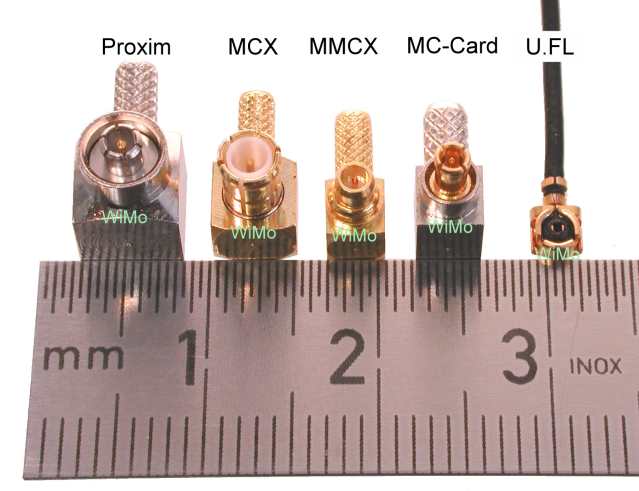
At the end of the day, it all depends on the manufacturer. Ano ba sabi sa manual? Yung iba hindi naman kasi standard connectors ang gamit. I have a 2xDIN HU with a built-in 7" monitor ... yung ginamit na jack/socket para sa external TV antenna eh 3.5mm phono - para sa AF (Audio Frequency) yon hindi pang-RF (Radio Frequency).
-
Tsikoteer
- Join Date
- Mar 2006
- Posts
- 1,577
July 29th, 2008 07:15 PM #236Thanks sa mga info Sirs. Will be removing the unit to see what connector does the GPS have (if any that is). Na-curious lang kasi may GPS function na clickable sa main menu e. Will try na rin to insert a GARMIN SD Card map and see if it works.
-
Tsikoteer
- Join Date
- Mar 2006
- Posts
- 1,577
July 31st, 2008 08:20 PM #237bummer... video-in lang yung para sa GPS. Contacted the manufacturer and comment nila ay via video-in lang pwede, meaning kung may video out yung gps pwede mong itap sa unit for added display, yun lang.
Weird naman at may GPS button pa sa unit mismo.
-
Tsikot Member Rank 3
- Join Date
- Apr 2006
- Posts
- 894
July 31st, 2008 11:37 PM #238malamang yung GPS button na 'yan e similar say sa mga menu ng AVH-P6850DVD/AVH-P5750DVD HUs ng Pioneer na pwedeng ikabit sa AVG-VDP1 (GPS unit) nila. Kungbaga, parang short cut mo lang. dun sa video display. Kungbaga, kung may pumapasok ng video feed yung GPS unit mo, at nanonood ka ng TV (kung may tuner yung HU mo) pag"click" mo dun sa GPS, labas kaagad yung feed ng GPS unit mo.
.02 hth.
-
Tsikot Member Rank 3
- Join Date
- Sep 2005
- Posts
- 1,218
August 1st, 2008 02:08 AM #239Bihira lang ang navigation device na may port para sa Video Out.
ScandalCam na lang ikabit mo.
-
Tsikot Member Rank 3
- Join Date
- Apr 2006
- Posts
- 894
August 1st, 2008 03:32 PM #240OT: haynaku nasa loob ang kulo... ng tiyan. haha.
tip: yung mga gps na walang built-in display, malamang sa hindi may video out. hehe.

 Reply With Quote
 Originally Posted by StraightSix

![GPS Navigation System [merged threads]](https://play.google.com/intl/en_us/badges/images/generic/en_badge_web_generic.png "Google Play")