
hi peeps,
Ano pong maganda these days? i'm not really after the most cutting edge stuff, basta maganda coverage.
i've bought Asus RT-N10, TP-LINK WR-642 and a Linksys WRT320 -- pumapalya lahat: signal strength tends to fluctuate, unexplained packet loss, etc.
Budget max. is 5k; i'm really tempted to get the higher end ones(e.g. Asus Dark Knight series) but something tells me i really don't need anything that high-tech.
tia

The Largest Car Forum in the Philippines
- Forums
- Discussions
- Events
- Community
Results 1 to 20 of 65
-
 Tsikoteer

- Join Date
- Aug 2003
- Posts
- 9,720
August 15th, 2013 10:28 AM #1
-
 Le Bombardier
- Join Date
- Jun 2006
- Posts
- 6,104
August 15th, 2013 11:03 AM #2Yeah, wag ka muna bumili ng super high end kasi pa-mainstream pa lang ang WiFi AC (gigabit wifi). Meron nang mga routers with such feature na available though pero more than 5k.
I've had good experience with Belkin, Linksys and Edimax. Others say TP-Link is okay too.
-
 Tsikoteer
- Join Date
- Sep 2010
- Posts
- 1,818
August 15th, 2013 11:40 AM #3for home use?
binili ko sa bahay ng parents ko D-LINK - DIR-600 and using dd-wrt firmware.
almost two years na ok pa naman.
kung gusto mo i-extend yung coverage - palitan mo ng high gain antenna.
-
 Tsikot Member Rank 2
- Join Date
- Nov 2007
- Posts
- 2,566
August 15th, 2013 12:55 PM #4im using CDR-king 2yrs onwards.. okay naman.. pinalitan ko lang ung antenna na mas malaki
-
 Social Dementia
- Join Date
- Sep 2003
- Posts
- 25,189
-
 Tsikoteer
- Join Date
- Sep 2012
- Posts
- 2,809
August 15th, 2013 02:15 PM #6Usual common problem ng wifi na nag fluctuate is depende kung ano meron sa pader na malapit sa kanya.
More often than not hahanapin mo lang talaga kung saan maganda reception makukuha mo or option mo na rin is to use a dedicated wireless bridge for bigger coverage.
-
 Tsikoteer
- Join Date
- Oct 2011
- Posts
- 26,781
August 15th, 2013 02:37 PM #7I only use linksys router. meron naman mga wider range sa linksys series pili ka lang.
-
 Одна из черт возьми
- Join Date
- Oct 2002
- Posts
- 15,528
August 15th, 2013 03:14 PM #8best bang for the buck i've used is linksys/cisco.
using asus now.... ok din naman.
-
 Tsikoteer
- Join Date
- May 2010
- Posts
- 499
August 15th, 2013 03:48 PM #9Netgear ok na kung tight budget, kung may room for linksys go for it.. Pili ka nun may antenna, mas maganda range nila.. Alam ko meron model na may 2-3 antennas ang netgear at linksys..
Sent from my iPhone using Tapatalk
-
 Tsikoteer
- Join Date
- Aug 2003
- Posts
- 3,273
August 15th, 2013 03:59 PM #10i've used linksys, belkin, edimax, tp-link. ok naman lahat. madali talaga mag-fluctuate ang wifi especially if madaming walls sa house nyo. if you really want a steady connection then go wired. kaya sa bahay hindi ko pa talaga inaalis yung lan cables.
-
Tsikoteer
- Join Date
- Oct 2011
- Posts
- 26,781
-
 Tsikoteer
- Join Date
- Oct 2002
- Posts
- 29,354
August 15th, 2013 04:15 PM #12 Originally Posted by badkuk

Often times it is how the WIFI ROUTER is installed and configured (or not configured) that can be the cause of the problem.
Signal strength can suddenly drop if there are dense or thick walls or items between you and the router. To minimize this, it is recommended to install the wifi router at a high location with good line of sight between you and the router with minimal blockage.
You can also get better signal performance if you upgrade your "G" router to "N" router. Also going for a router with more antennas can increase the signal strength. There are routers with two or three antennas which would provide a stronger signal. Or you can try a taller replacement antenna but my experience the signal gains for these upgrade is only marginal at best.
My home wifi router is something like this:
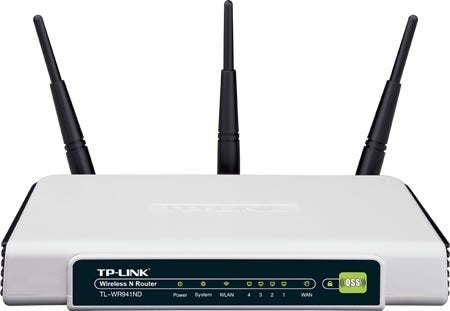
It's a TPLINK 300-N-WIFI router with three antennas. I have it mounted high on a wall. I don't have any issues with dropped signals at my condo except in my kitchen.
BTW, best to scan your area to see what existing wifi signals are there and what channels are being used. When you configure your router, make sure the channel it is using does not have the same number as another router. Having the same channel can cause interferance and a general slow down in data speeds.
-
Tsikoteer
- Join Date
- Oct 2011
- Posts
- 26,781
August 15th, 2013 04:51 PM #13^
sir GH, what do you mean by channels? saan ba makikita kung anong channel ang gamit?
-
Tsikoteer
- Join Date
- Oct 2002
- Posts
- 29,354
August 15th, 2013 05:13 PM #14Channels is a frequency setting that allows more users on a radio frequency without interference. It is like having different FM radio stations to choose from. Originally Posted by Retz
The CHANNEL setting would be found in the wireless settings of your router. There would be 12 or 13 channels available to choose from. Default would usually be AUTO or channel 7. Usually AUTO setting would be okay most of the time. Best to check with a wifi scanner if you want to manually set the channel.
-
Tsikoteer
- Join Date
- Oct 2011
- Posts
- 26,781
August 15th, 2013 06:01 PM #15^
okay sir GH check ko na lang ang pagka alam ko kasi may 4 ports lang sa likod ng router pero wala ako matandaan na you could switch channels.
-
 Moderator
- Join Date
- Nov 2010
- Posts
- 25,276
August 15th, 2013 06:03 PM #16Linksys ot TP-link user here. Just make sure na nakakabit sa UPS or may AVR man lang router mo at wifi and you're assured of many years of reliable service.
-
Tsikoteer
- Join Date
- Oct 2002
- Posts
- 29,354
August 15th, 2013 06:13 PM #17 Originally Posted by Retz
It happened that I initially had good reception and speed for my wifi network at home. Then over a year later, I was experiencing network slow down and some sudden disconnect/connect events (I sometimes watch movies streamed from my download server). I checked my wifi signals and discovered two strong wifi signals with one having the same channel number as my own wifi. I changed the channel and the problem was fixed.
-
Одна из черт возьми
- Join Date
- Oct 2002
- Posts
- 15,528
August 16th, 2013 10:24 AM #18bro, you can change the channels sa configuration ng router. sa software side, ika nga.... hindi sya physical setting. Originally Posted by Retz
-
Tsikoteer
- Join Date
- Aug 2003
- Posts
- 9,720
August 16th, 2013 10:50 AM #19weird yung nangyayari sa Linksys WRT320N ko: i made sure it was using an uncrowded channel, yet lumalabas na poor yung signal kahit pinatong ko na yung tablet sa router. i keep getting authentication errors, or the devices would simply refuse to connect. Halos lahat ng devices ganun ang behavior so tingin ko router me problema.
Then there'e the sudden packet loss that comes and goes. i doubt if the cabling's the problem.
i've hooked it up to an AVR just in case, ganun pa rin. Kinda miffed coz i shelled out around 3k for it, tapos pumapalya pa. Maflash kaya ng DD-WRT?
-
Tsikoteer
- Join Date
- May 2010
- Posts
- 499
August 16th, 2013 11:08 AM #20Panget ang linksys wrt320n, mas maganda pa yung mga entry level ng tenda, edimax at netgear.. Mas malakas signal..
Sent from my iPhone using Tapatalk

 Reply With Quote
 Originally Posted by badkuk

