Used Macrium Reflect to clone my wife's Win10 OS from HDD to SSD. I found it easier to use than EaseUS.Originally Posted by Tha_Mann


The Largest Car Forum in the Philippines
- Forums
- Discussions
- Events
- Community
Results 141 to 160 of 954
-
 Verified Tsikot Member

- Join Date
- Sep 2016
- Posts
- 2,348
February 6th, 2020 01:27 PM #141
-
 COO - Child of Owner
- Join Date
- Sep 2005
- Posts
- 15,310
February 7th, 2020 07:03 AM #142hmmmm tempting.. dami freebies.. and 24 months 0%..

Specs:
15.6" IPS 1920 x 1080
Screen to Body Ratio: 87%
Aluminum casing - slim design
AMD Ryzen 5 3500U
Radeon Vega 8 Graphics
8GB DDR4
256GB SSD + 1TB HDD
-
 Verified Tsikot Member

- Join Date
- Jan 2016
- Posts
- 6,813
February 7th, 2020 07:16 AM #143Can't see the image, what brand and how much? Just curious, matches the specs of my new motile 14 except for screen size and the addtl 1 TB HDD, which cost me 20k.
Originally Posted by _Qwerty_
-
COO - Child of Owner
- Join Date
- Sep 2005
- Posts
- 15,310
February 7th, 2020 07:19 AM #144it's the Huawei Matebook D15 for Php1,583.00 x 24 months.
Freebies worth Php14,990.00
Huawei Mediapad T3 8"
Huawei Backpack
Huawei Mouse
Microsoft Office 365
Umbrella
Originally Posted by papi smith
-
Verified Tsikot Member
- Join Date
- Jan 2016
- Posts
- 6,813
-
 Verified Tsikot Member
- Join Date
- Oct 2002
- Posts
- 991
February 7th, 2020 09:27 AM #146I read good things about EaseUS. It's been ages since I've done ghosting a HDD haha. today iba na meaning ng ghosting hehe. Thanks! Originally Posted by Archerfish
I saw it nga with my WD SSD, they have their own cloning app, might as well try it. Thanks! Originally Posted by WallyWest
uy nice, another option. Thanks! Originally Posted by yubby24
-
 Verified Tsikot Member
- Join Date
- Dec 2017
- Posts
- 2,686
February 7th, 2020 10:06 AM #147In my dictionary, it says that ghosting is the "method of ending a personal relationship by stopping all contact without explanation". Originally Posted by Tha_Mann
Why is it that I have a hunch that there's another definition of ghosting?
[emoji3]
-
 Tsikoteer
- Join Date
- Jan 2006
- Posts
- 12,398
February 7th, 2020 12:08 PM #148You mean, pressing the troubleshoot button activated Windows 10 with its own product key? Cool. Originally Posted by papi smith
-
Verified Tsikot Member
- Join Date
- Jan 2016
- Posts
- 6,813
February 7th, 2020 12:42 PM #149I think it triggered the activation thru digital license linked to my account. Still curious, I ran produkey again and now the key is similar with the BIOS. Maybe the previous key is for unactivated releases. Originally Posted by Jun aka Pekto
-
Verified Tsikot Member
- Join Date
- Oct 2002
- Posts
- 991
February 10th, 2020 12:13 PM #150I tried WD's Acronis app for cloning my HDD, took about 2 1/2 hrs to get it done. I'm so happy with the upgrade, boot up time took about 30 seconds tops. and much faster na yung pag launch ng apps.
-
Verified Tsikot Member
- Join Date
- Jan 2016
- Posts
- 6,813
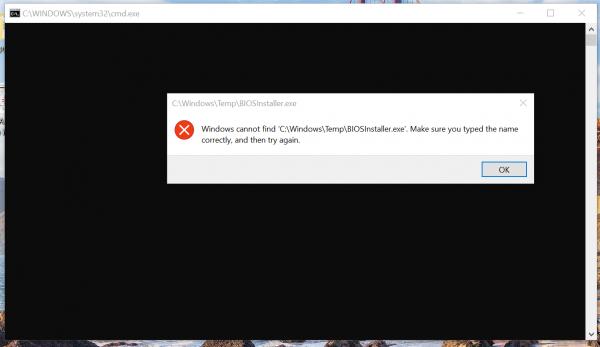
February 18th, 2020 09:43 PM #151Help please, this screen appears whenever I boot my laptop, can anyone help me please, thank you...

Edit add: I just press ok, and everything goes to normal
-
 Fix Or Repair Daily
- Join Date
- Sep 2013
- Posts
- 1,832
February 18th, 2020 10:19 PM #152Ano b magandang laptop ngayon, ok ba yung DELL lagi sya sa top 1
Sent from my SM-N975F using Tapatalk
-
Verified Tsikot Member
- Join Date
- Sep 2010
- Posts
- 290
February 18th, 2020 10:26 PM #153 Originally Posted by NiCe2KnowU
Ung Asus laptop brand na binili ko last 2014 (mag 6 years na) gumagana pa hanggang ngayon. Take note, wala pa ko napapalitan na parts even ung battery gumagana pa. Pinaka issue lang ngayon ay kelangan na ireformat + upgrade or add ng additional ram since mabagal na hehe.
Maganda kasi review ng Asus lalo na sa motherboard nila.
HTH!
-
 3.14159265
- Join Date
- Aug 2004
- Posts
- 6,234
February 18th, 2020 11:13 PM #154May Asus and Dell kami both 15.6" i5. Mas matibay ang feeling ng Dell pero mas may features ang Asus like the finger reader and a better vid card for a similar price. Originally Posted by NiCe2KnowU
Sabi ng Dell Phils wala daw warranty issue with DIY upgrades as long as walang physical damage. The day after I got it nilagyan ko agad ng 512GB SSD. I DIY installed an SSD in the Asus as well as soon as the warranty expired.
Both are doing well after more than a year of daily use. The Asus is my son's FPS laptop while the Dell is my work and play machine. I bought mechanical keyboards for both to preserve the onboard keys.
Sent from my SM-A605G using Tapatalk
-
Fix Or Repair Daily
- Join Date
- Sep 2013
- Posts
- 1,832
February 19th, 2020 12:18 AM #155Hinahanap ko Yung pinakamalinaw I think 4k display na pati pinaka mabilis na, para paabutin ko ulit NG 10 years
Meron akong acer laptop January 2012 pa binili hindi pa tumitirik hangang ngayon ginagamit ko pa dati halos 12 hours a day pero ngayon 6-8 hours pero matibay pa rin, pero balak namin kumuha NG bago Yung latest Sana specs top of the line
First choice ko dati asus, next Yung macbook pro.. after ko manood kay youtube ngayon Dell na, pero pinagpipilian ko pa Rin, malaking bagay din kasi Yung virus eh
Sent from my POCOPHONE F1 using TapatalkLast edited by NiCe2KnowU; February 19th, 2020 at 12:26 AM.
-
 Dalek
Dalek
- Join Date
- Dec 2006
- Posts
- 17,314
February 19th, 2020 12:43 AM #156Lenovo X1 Carbon - Quad-core i7, 16GB RAM, 512GB SSD, 4K (2160p) display Originally Posted by NiCe2KnowU
Macbook Pro 13.3" - Quad-core i5, 8GB RAM, 256 SSD, Retina (1600p) display
Build quality of the X1 Carbon is top-notch. Mine is a year old but still feels more solid than the brand new HP Envy X360 I bought for my mom.
I also have an older Lenovo Ideapad Y310 from 2008, still works to this day. Macbooks are also quite durable, my 2013 MBP still works today.
If you're set on getting a Dell, the XPS line is really good although I still feel the X1 Carbons are built tougher.
Sent from my SM-N970F using Tapatalk
-
 Verified Tsikot Member
- Join Date
- May 2019
- Posts
- 4,049
February 19th, 2020 01:26 PM #157Laptop ko sa work Lenovo X1 Carbon din.. Sobrang gusto ko dahil sobrang gaan at manipis.. Tsaka gusto ko yung keyboard.. gusto ko tunog kapag nagta-type.. Naha hype ako, feeling hacker na meron kelangan idecrypt tapos nadecode.. satisfying.. Hahahahahaha [emoji23] Originally Posted by jut703
Sent from my CPH1907 using Tapatalk
-
Fix Or Repair Daily
- Join Date
- Sep 2013
- Posts
- 1,832
February 19th, 2020 08:58 PM #158Thanks sir, icheck ko yan Originally Posted by jut703
Sent from my SM-N975F using Tapatalk
-
BANNED BANNED BANNED
- Join Date
- Sep 2015
- Posts
- 13,917
February 21st, 2020 05:51 AM #159Totoo. Napakaimportante kaya ng cut/copy paste.
Larry Tesler, Modeless Computing Advocate, Has Passed Away
News
The Computer Scientist Responsible for Cut, Copy, and Paste, Has Passed Away
Andrew Liszewski
Yesterday 10:54AM
Filed to:Larry Tesler
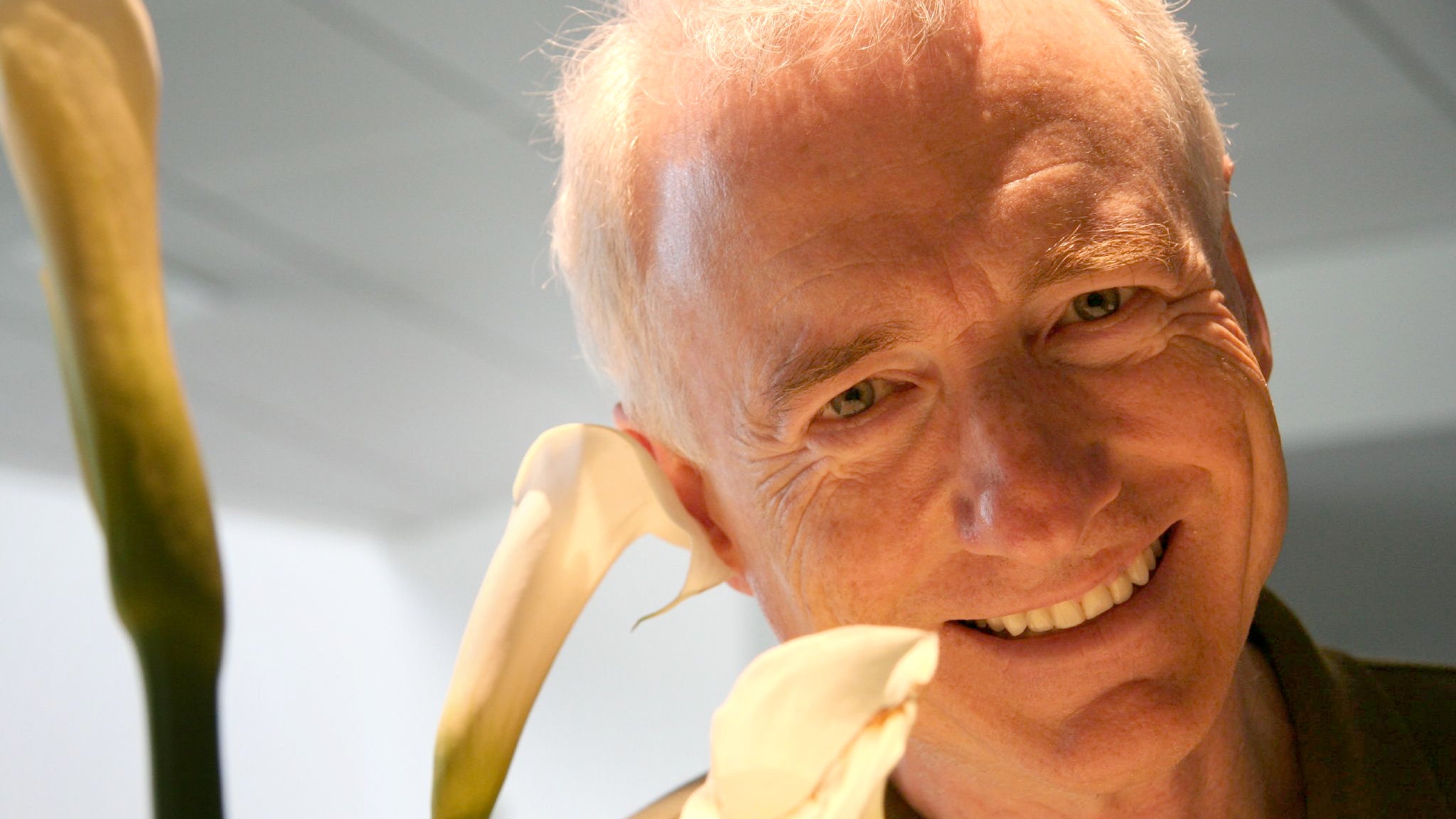
The advent of the personal computer wasn’t just about making these powerful machines available to everyone, it was also about making them accessible and usable, even for those lacking a computer science degree. Larry Tesler, who passed away on Monday, might not be a household name like Steve Jobs or Bill Gates, but his contributions to making computers and mobile devices easier to use are the highlight of a long career influencing modern computing.
Born in 1945 in New York, Tesler went on to study computer science at Stanford University, and after graduation he dabbled in artificial intelligence research (long before it became a deeply concerning tool) and became involved in the anti-war and anti-corporate monopoly movements, with companies like IBM as one of his deserving targets. In 1973 Tesler took a job at the Xerox Palo Alto Research Center (PARC) where he worked until 1980. Xerox PARC is famously known for developing the mouse-driven graphical user interface we now all take for granted, and during his time at the lab Tesler worked with Tim Mott to create a word processor called Gypsy that is best known for coining the terms “cut,” “copy,” and “paste” when it comes to commands for removing, duplicating, or repositioning chunks of text.
Xerox PARC is also well known for not capitalizing on the groundbreaking research it did in terms of personal computing, so in 1980 Tesler transitioned to Apple Computer where he worked until 1997. Over the years he held countless positions at the company including Vice President of AppleNet (Apple’s in-house local area networking system that was eventually canceled), and even served as Apple’s Chief Scientist, a position that at one time was held by Steve Wozniak, before eventually leaving the company.
In addition to his contributions to some of Apple’s most famous hardware, Tesler was also known for his efforts to make software and user interfaces more accessible. In addition to the now ubiquitous “cut,” “copy,” and “paste” terminologies, Tesler was also an advocate for an approach to UI design known as modeless computing, which is reflected in his personal website. In essence, it ensures that user actions remain consistent throughout an operating system’s various functions and apps. When they’ve opened a word processor, for instance, users now just automatically assume that hitting any of the alphanumeric keys on their keyboard will result in that character showing up on-screen at the cursor’s insertion point. But there was a time when word processors could be switched between multiple modes where typing on the keyboard would either add characters to a document or alternately allow functional commands to be entered.
There are still plenty of software applications where tools and functionality change depending on the mode they’re in (complex apps like Photoshop, for example, where various tools behave differently and perform very distinct functions) but for the most part modern operating systems like Apple’s macOS and Microsoft’s Windows have embraced user-friendliness through a less complicated modeless approach.
After leaving Apple in 1997, Tesler co-founded a company called Stagecast Software which developed applications that made it easier and more accessible for children to learn programming concepts. In 2001 he joined Amazon and eventually became the VP of Shopping Experience there, in 2005 he switched to Yahoo where he headed up that company’s user experience and design group, and then in 2008 he became a product fellow at 23andMe. According to his CV, Tesler left 23andMe in 2009 and from then on mostly focused on consulting work.
While there are undoubtedly countless other contributions Tesler made to modern computing as part of his work on teams at Xerox and Apple that may never come to light, his known contributions are immense. Tesler is one of the major reasons computer moved out of research centers and into homes.
-
Verified Tsikot Member
- Join Date
- Jun 2015
- Posts
- 2,751
February 26th, 2020 11:48 PM #160Seems like a BIOS update that was interrupted. You could try looking at startup entries and deleting the task that executes that biosupdate.exe. CCleaner has a feature for looking at programs that load upon start up. Originally Posted by papi smith
Or you could try a System Restore.
 Originally Posted by Tha_Mann
 please recommend a good harddisk clone application. thanks.
 Reply With Quote