


hmmmmm
baka mali lang pagkaburn ko. hehehe
ayos ba ung xandros? pano ako mag iinstall ng mga apps? madali lang ba? pwede bang direct install na nung mga apps ng windows? o may separate installer ung pang linux/xandros. ung ibang apps kasi may separate pang linux. since mukhang hi-tech na tong xandros baka pwede na diretso.... hehehe.

The Largest Car Forum in the Philippines
- Forums
- Discussions
- Events
- Community
Results 121 to 140 of 169
Hybrid View
-
 fLaKeZ

- Join Date
- Oct 2002
- Posts
- 4,388
January 24th, 2006 10:44 PM #1
-
 Tsikoteer
- Join Date
- Oct 2002
- Posts
- 29,354
January 24th, 2006 10:48 PM #2unfortunately I was just trying different flavors of linux because of the licensing push of MS. I didn't get very far into getting applications ported over from MS to Linux though. If I remember correctly, most of the "plug & play" Linux already has some word processor and spreadsheet apps included.
-
fLaKeZ
- Join Date
- Oct 2002
- Posts
- 4,388
January 24th, 2006 10:59 PM #3ah ok. most of the apps na kelangan ko naman e designed for linux, kaso lang ang problema kelangan ko mag dl ulit. hay buhay.
BTW. how do you burn the installer CD? what i did is i extract the iso file and burn it into a blank CD. i dont know how to burn iso files. hehehe
-
Tsikoteer
- Join Date
- Oct 2002
- Posts
- 29,354
January 24th, 2006 11:24 PM #4 Originally Posted by fLaKeZ
to burn an ISO file to CD, simply use your software (I use NERO) and choose burn CD from file option. The resulting CD will be a copy of the original source CD.
-
 SINONG TATAY MO!?
- Join Date
- Oct 2002
- Posts
- 6,794
January 24th, 2006 11:26 PM #5you burn iso files using alcohol120% or daemon.hindi pwede yung ordinary nero =)
-
Tsikoteer
- Join Date
- Oct 2002
- Posts
- 29,354
January 25th, 2006 12:32 AM #6 Originally Posted by GlennSter
actually I used Nero 5.0 included with my CDRW drive... works fine.
-
fLaKeZ
- Join Date
- Oct 2002
- Posts
- 4,388
January 24th, 2006 11:33 PM #7wouldnt it result to an ISO file? or it will extract itself while burning in to the cd? i remember i tried burning an iso file before but the result is still an iso file. hehehe. anyways, thanks. i guess i'll just have to try it again.
-
 Verified Tsikot Member
- Join Date
- Jul 2005
- Posts
- 296
-
SINONG TATAY MO!?
- Join Date
- Oct 2002
- Posts
- 6,794
-
fLaKeZ
- Join Date
- Oct 2002
- Posts
- 4,388
-
SINONG TATAY MO!?
- Join Date
- Oct 2002
- Posts
- 6,794
January 24th, 2006 11:45 PM #11you can download it free sa site nila...30 days nga lang.mas gusto ko alcohol....parang ang sarap pakinggan.hahahaha
-
 kennonballer
- Join Date
- Aug 2003
- Posts
- 918
June 24th, 2006 06:50 PM #12linux gurus, i need assistance here...
i just bought a new computer and i installed ubuntu 5.10 as its os this morning. the install was uneventful except that it did not autoconfigure the network setting due to a dhcp thingy that i don't have any idea about. anyway, this is the startup screen:
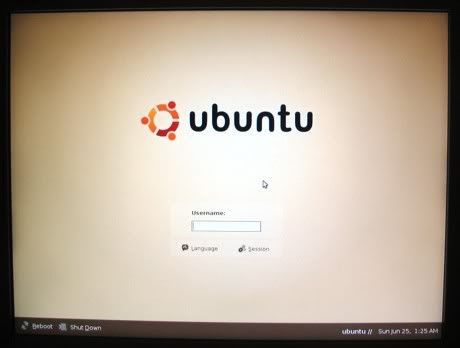
after i logged in i was greeted by a blank desktop and i don't have any idea how to access the programs packaged with the original ubuntu install cd.
help guys! i am not going to give up on this easy.
buti na lang my older computer is right at the back of this new one.
btw, i installed the 64-bit ubuntu version on an athlon 64 3000 computer.
-
 Engineer kunwari
- Join Date
- May 2005
- Posts
- 497
June 25th, 2006 06:13 PM #13I read some time back that the 64 bit offering of ubuntu is still buggy, i would suggest that you try the 32 bit version first Originally Posted by diesoline
-
 Tsikot Member Rank 5
- Join Date
- May 2006
- Posts
- 8,357
June 24th, 2006 08:50 PM #14Napakahirap gamitin LINUX tapos yung compatibility issue pa nyan sa mga programs. karamihan naman kasi ng mga programs windows base. ang napag run ko pa lang dyan sa LINUX yung Counter Strike, Yahoo Messenger. Bayanihan Linux pala ginamit ko dati parang Windows XP din.
-
Toyota is my choice
- Join Date
- Aug 2005
- Posts
- 2,063
June 24th, 2006 11:53 PM #15do you have problem extracting .ISO file?
If you want an extractor for .iso file Message me up at YM ID: finchyme18Last edited by finchy18; June 24th, 2006 at 11:56 PM.
-
 The Silent Threat
- Join Date
- Dec 2004
- Posts
- 1,310
June 24th, 2006 11:59 PM #16I already use OpenOffice.org and Linux. But my main OS is still Windows XP, mostly because I'm a gamer, partly because it just works well.
-
Toyota is my choice
- Join Date
- Aug 2005
- Posts
- 2,063
June 25th, 2006 12:01 AM #17you need to have a short bacground about linux. You'll get to know each other . Its little bit hard
-
kennonballer
- Join Date
- Aug 2003
- Posts
- 918
June 25th, 2006 09:32 PM #18finchy18: no problem extracting the .iso file. the install cds i have are ubuntu originals lent to me from a friend who requested them (FREE!) at shipit.ubunto.com.
laklak: thanks for the heads-up. i will try the live cd of the 32-bit version tomorrow. i have already formatted the hard drive and am currently on xp now.
guys, favor lang, could you give me some points on how to do a dual boot install? tia!
-
 Tsikot Member Rank 3
- Join Date
- Sep 2003
- Posts
- 1,064
June 25th, 2006 09:56 PM #19Pag dual boot ang gusto mo.. i partition mo muna yung HDD mo... pero wag mo na muna i format sa windows... just let the Linux format it into EXT2 format. I use REDHAT and FEDORA LINUX... works great for me... but .. yun nga lang .. di lahat ng mga applications na gusto mo ay tatakbo.... but it's good to play around with Linux..
-
kennonballer
- Join Date
- Aug 2003
- Posts
- 918
June 25th, 2006 10:03 PM #20thanks for the prompt reply, wrcastro_ph! i didn't see a choose drive option in the express install. i hope the custom install option will have it. thanks again.


 Reply With Quote
 Originally Posted by fLaKeZ
