
nosebleed ako sa usapan ninyo... type ko mag Mac pero baka hindi mag run yung isang dos base business program ko... I downloaded the DOSbox (tnx Jun aka Pekto)... hopefull the Mac store will allow me to test their unit first.

The Largest Car Forum in the Philippines
- Forums
- Discussions
- Events
- Community
Results 41 to 60 of 61
-

 Tsikoteer

- Join Date
- Oct 2009
- Posts
- 473
October 28th, 2009 09:37 AM #41
-
 Tsikoteer
- Join Date
- Jan 2006
- Posts
- 12,398
October 28th, 2009 10:33 AM #42DOS-based business app? What is the app and what are are the system requirements? Originally Posted by Phoenix67

If you're not familiar with the Mac and you want to try running MS-DOS software on it, the first thing you need to know is it's not for the weak. You may get lost and end up getting frustrated.
If this is your livelihood we're talking about, it's best to stick with the same old computer you have the MS-DOS application in or stick with a Windows pc. Otherwise, it's time to move on and learn newer applications.
If you choose to go Mac and insist on using your old DOS programs, you'll be forced to maintain software for two different platforms. Unless you're savvy enough, it's not a good idea not to mention it's not very efficient.Last edited by Jun aka Pekto; October 28th, 2009 at 10:37 AM.
-
Tsikoteer
- Join Date
- Oct 2009
- Posts
- 473
October 28th, 2009 02:05 PM #43it is a feed formulation program which was done on MSBasic language yata. Since hindi naman laging ginagamit... okay lang na parang "pop-up" window siya in a Mac environment.
I think the DOSbox might work. Baka nextweek ay mapasyal ko yung suki kong Mac store
-
Tsikoteer
- Join Date
- Jan 2009
- Posts
- 817
October 28th, 2009 02:08 PM #44Anyone know where I can find a list of official Apple product sellers who provide official Apple warranty?
-
 Tsikot Member Rank 5
- Join Date
- Oct 2002
- Posts
- 2,716
-
Tsikoteer
- Join Date
- Jan 2006
- Posts
- 12,398
October 28th, 2009 07:23 PM #46You could see if it'll work in DOSBox for Windows. If it works there, then chances are it'll work with DOSBox for OSX as well. Originally Posted by Phoenix67
-
Tsikoteer
- Join Date
- Oct 2009
- Posts
- 473
October 28th, 2009 09:26 PM #47but I don't need a DosBox for windows to run it (the software I was talking about) in windows... I simply open it sa command promt... yun na.
wala kasing command prompt yata ang Mac and it probably does not read the typical dos based programs.
-
 Wheelin and Dealin'
- Join Date
- Feb 2008
- Posts
- 14,181
October 28th, 2009 11:07 PM #48Without a DOS emulator eh di hindi talaga tatakbo yan sa Mac. Kung command prompt sa Windows pwede na then maybe virtualizing Windows XP could work. It just sucks out too much resource kais you are running 2 OS's at the same time.
Which goes back to why I am not a firm believer of OSX. There is still too much software missing for it that only Windows can provide.
-
Tsikoteer
- Join Date
- Jan 2006
- Posts
- 12,398
October 29th, 2009 01:52 AM #49Well, if it's running Windows on a Mac, there's a ton of options: Originally Posted by Phoenix67
1. Run Windows natively by booting to Windows via Bootcamp
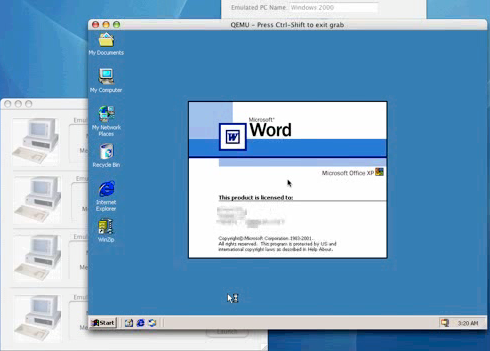
2. Run Windows through commercial virtualization software:
Parallels
VMWare Fusion
iEmulator
3. Run Windows via open-source emulators such as Bochs and VirtualBox
If you want to remain within the OSX environment and full speed isn't a concern, Parallels would have my vote.
Unix-based operating systems all have a Command Line Interface (CLI). Naturally, they're not geared to run MS-DOS apps or recognize MS-DOS commands.
VirtualBox

Parallels:

Mac Bochs

iEmulator
-
Tsikoteer
- Join Date
- Oct 2009
- Posts
- 473
October 29th, 2009 05:34 AM #50malaking tulong ang mga inputs ninyo, maraming salamat mga bossing ... kahit medyo nosebleed pa ako dyan... susubukan kong magbasabasa pa.
anyway, by next week, susubukan ko sa laptop na Mac yung Dos-based program na sinasabi ko... sana gumana para makapagmigrate na ako into Mac....
....I am itching to get that Mac with the 24" screen and punny keyboard.... hehehe
pati yung anak ko na into video editing ang kinahihiligan.... "bright eyes" nung sinabi kong masmadali at maganda gawin yung trip niya sa Mac...
ang current set-up ko ay isang 4year old na PC running on AMD Athlon 64 with 2Gig ram, SATA HDD and a 21" Acer LCD (forgot the specs the video card... but it was pretty one of the top-of-the-lines 4 years ago)... it is fast enough... pero I am really just waiting for it to "die" para may dahilan na akong makabili ng Mac.
kung mapapagana ko sa mac laptop yung dos-based program ko ... pati laptop ko gagawin ko na ring Mac hehehehe
-
 Tsikoteer
- Join Date
- Aug 2003
- Posts
- 3,273
October 29th, 2009 10:08 AM #51gumagana yan sa Windows kasi integrated pa din ang DOS sa Windows as its console interface. sinabi ni JAP to test it in DOSBox for Window para makita mo kung gagana din sya sa DOSBox for OS X without having to test it directly on Mac.but I don't need a DosBox for windows to run it (the software I was talking about) in windows... I simply open it sa command promt... yun na.
wala kasing command prompt yata ang Mac and it probably does not read the typical dos based programs.
OS X has a "command prompt" but since Mac is based off of FreeBSD (a variant of Unix) your app will not work on it.
so just to reiterate...
hindi gagana yan DOS-based app mo sa Mac unless you use an emulator like DOSBox.
aside from DOS emulators, another option, as JAP pointed out above, is to have Windows run inside Mac OS X then run your app inside that instance of Windows.
-
 Le Bombardier
- Join Date
- Jun 2006
- Posts
- 6,104
October 29th, 2009 11:10 AM #52Phoenix, luma na yung 24, mga 21.5" and 27" na ang iMacs ngayon. Puro IPS ang panels kaya mas maganda. :D
-
 Ignore
- Join Date
- Oct 2006
- Posts
- 5,994
October 29th, 2009 11:21 AM #53also in case you haven't noticed. read HP's signature ;)
Damn, son! Where'd you find this?

-
 Tsikoteer
- Join Date
- Dec 2007
- Posts
- 3,938
October 29th, 2009 11:30 AM #54Ano ba iyang DOS program na iyan, sir? Kung nag-a-access siya sa serial ports, baka magka-problema ka sa DOSBOX. Originally Posted by Phoenix67
Kung database application siya (CLIPPER? FOXBASE? DBASE?) malamang aandar iyan.
-
Tsikoteer
- Join Date
- Oct 2009
- Posts
- 473
October 29th, 2009 05:00 PM #55it is a linear programming software... afaik done in Basic language... it might work with dosbox, kasi hindi gumagamit nung serial ports. Originally Posted by woohoo
an upgrade of that software is worth $3000 (windows base, I don't know if they have a MAC version)... (I had spent P50,000 lang dun sa DOS base program... a long time ago)... since it is still working naman, I'd rather spend my $3000 on a new desktop MAC (27" is very interesting sir HP - please PM me your details of shop) for home use and a ask my office to get me the MAC laptop for my use in the field.
thanks for the advise mge tsikot peeps... very helpful talaga
as i said, my first step is to try the dosbox on mac...
-
 Tsikot Member Rank 2
- Join Date
- Jan 2009
- Posts
- 6,452
June 12th, 2011 10:20 PM #56Just reviving the thread... I want to kinda do two things at the same time:
1. Try out the Mac
2. Switch to a minimalist home computer
For #1, like the TS, I have been around PCs all my life (close to 30 years) and I'd like to venture a change. I'd probably keep my existing PC (Intel quad-core Q9550 with 4GB RAM) as a play-thing for me and the kids to horse around with in the rec room. But me and the Mrs. will probably be on the Mac for everything from browsing the Internet, to viewing photos and a bit of video editing. Will the latest Mac Minis cover that? I have extra 22" and 23" Samsung LCDs so at least all I need is a keyboard and mouse, and maybe a small 2.1 speaker system.
For #2, as I've mentioned on another thread, we're remodeling our home and I think that with the way things are going to be, the big-ass gaming rig I have, with its own dedicated computer table, will stick out like a sore thumb in our living room. I'm opting to get an all-glass desk (something like the pic below, but with a Mac Mini) that me and my wife can use as both a computer and work desk.

What do you guys think?
-
 Tsikoteer
- Join Date
- May 2011
- Posts
- 148
June 13th, 2011 12:09 AM #57I have been for the longest time a Windows PC user (from Windows 3.1 to XP), but 3 years ago I decided to switch to Mac, the main reason is Virus, worms and other malwares. My job requires me to look at numerous files from clients, which are often done through a USB thumb drive or email, during my Windows days I get infected quite reguarly which is always a time wasting effort to clean up the computer. Though the cost is more, the time saved cleaning up virus on the computer and spending for anti-virus software was worth every penny. One thing I did realize though, Mac's compared to a similarly spec Windows computer are not faster when running the same software, so do not expect that it will out perform a Windows PC. My other gripe with the Mac OS is they are more difficult to trouble shoot, and if a problem occurs (though rarely) will take more time to find a solution than problems with the Windows OS.
Oh yeah, the Mac looks preetier too.
-
Verified Tsikot Member
- Join Date
- Aug 2009
- Posts
- 46
June 13th, 2011 11:49 PM #58you need to buy also a vga cable adapter for your samsung monitor. hindi standard vga connector ang mac mini. Originally Posted by oj88
-
Tsikot Member Rank 2
- Join Date
- Jan 2009
- Posts
- 6,452
June 14th, 2011 12:57 AM #59Got that covered. The 22" has VGA and DVI while the 23" has VGA, DVI and HDMI. Originally Posted by abril
-
BANNED BANNED BANNED
- Join Date
- Nov 2008
- Posts
- 1,383
June 15th, 2011 01:07 AM #60Personally, I use an APPLE MAC Desktop at home, and a WINDOWS Laptop. (plus an ANDROID Sony phone, and an iPad), to corner all the Tech bases.
What I can say is a Windows system can do whatever a Mac does....and more.
What you are paying (a lot) more for is the Product design and the quality "finesse" of the OS. If you can afford the ARTE, then go for it. But it is not a necessity.
Think KENWOOD vs. MARK LEVINSON stereo.

Steve Jobs uses ML system in his home. Plus Wilson Audio speakers, BTW.

 Reply With Quote
 Originally Posted by Phoenix67
