
I was at SM Annex Cyberzone yesterday and was already about to flip out my credit card and purchase new HTPC hardware. But then, I suddenly had cold feet and decided to hold on to my money until such time I'm sure of my purchase.
Since WinXP MCE came out several years ago, I've always wanted to get into the technology bandwagon and build one myself. But due to other priorities and cost, my plan never reached fruition. I only got as far as to get two standalone hard disk multimedia players which are basically glorified external USB drives as they're not network-attached. Though, two years back when I bought these, they did had that wow factor when they were still not as popular as they are now (ie. WD TV). Needless to say, it's come to the point that I've outgrown these players and I would like something more than just play music and movies.
For now, I have two choices; Build myself an HTPC running Windows 7 (Ultimate or Home Premium MCE), LinuxMCE, XBMC, etc., or get one of those set-top Networked Media Tanks (NMT). Based on the current pricing, I can build an HTPC for about 15-16k, give or take. NMT's that has the features I want (Web Services) costs approx. 13-19k. Web Services allows NMT's to stream YouTube, Google Videos, Internet TV and music, among other things, to my TV/monitor and receiver.
The one fabulous thing about NMT's is that they work right out of the box. Just power it up and connect it to your TV/monitor and sound system and you're done. They're purpose-built and streamlined to do only one thing. However, I'm at the mercy of the manufacturer to come out with new firmware updates, cooked or otherwise, to support new features.
With an HTPC, it's the entire opposite. Setting it up would probably take me a day or two to make everything work together (OS install, updates, applications, tuner setup, MCE remote setup, drivers, codecs, etc.). But I guess in the long run, the inherent modularity of an HTPC means I can upgrade any part of the hardware to keep it up to date. Additionally, HTPC's may include home automation features like being able to integrate IP cameras, or control appliances, etc. (using LinuxMCE, for instance), I'm more inclined to go this route. Electricity? Well, I'm sure the nuclear reactor I have in the attic will still be able to take the grunt. :D
These are so far the only things I can think of right now. Just spilling my brains here... please chime in if you can add something that can help me decide.

The Largest Car Forum in the Philippines
- Forums
- Discussions
- Events
- Community
Results 1 to 19 of 19
-

 Tsikot Member Rank 2

- Join Date
- Jan 2009
- Posts
- 6,452
September 1st, 2009 10:10 AM #1
-
 Tsikot Member Rank 8
- Join Date
- Oct 2002
- Posts
- 21,433
September 1st, 2009 10:19 AM #2If you're not going to move around the HTPC/NMT, meaning take it with you when you go on holidays, they go with the HTPC setup.
-
 Tsikoteer
- Join Date
- Oct 2002
- Posts
- 29,354
September 1st, 2009 01:01 PM #3If you are willing to put in the effort for the build, I would rather go HTPC option. It is more flexible in what you want it to do as well as open to any software and hardware upgrades you would like in the future.
HTPCs would give you the option to view your videos and go on the internet to browse sites as well as other stuff like TV (USB tv tuners are getting cheap).
-
Tsikot Member Rank 2
- Join Date
- Jan 2009
- Posts
- 6,452
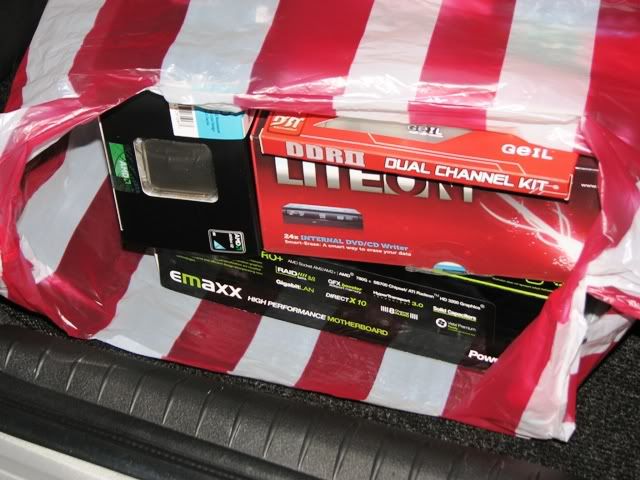
September 2nd, 2009 12:11 AM #4Ok, so I took the plunge today and burned some dough for my HTPC project. It's still incomplete but here's a peek at things to come...

-
Tsikoteer
- Join Date
- Oct 2002
- Posts
- 29,354
September 2nd, 2009 04:10 AM #5So what did you buy so far and how much did it cost you?
I just bought a e-machine for P15K. Not bad for a dualcore CPU, HDD, DVD-R and Nvideo 7050 equipped PC as the core of my current HTPC. I just added a wifi N adapter and USB tv tuner to complete it.
-
Tsikot Member Rank 2
- Join Date
- Jan 2009
- Posts
- 6,452
September 2nd, 2009 09:37 AM #6Here's what I've got so far: Originally Posted by ghosthunter

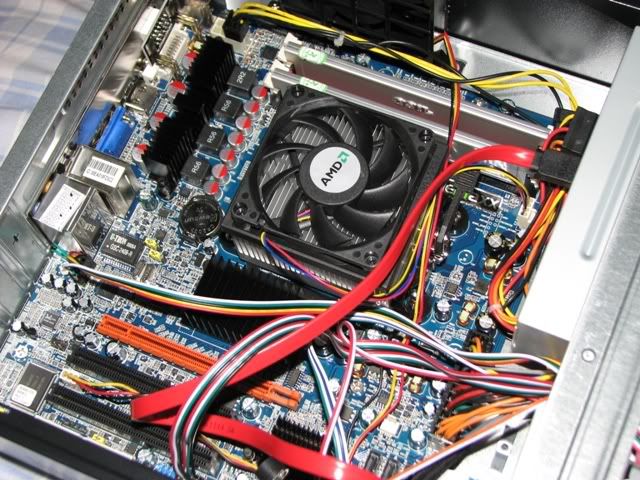
Motherboard: Emaxx AMD780G-Pro
CPU: AMD Athlon X2 7750 (Dual-core * 2.7GHz)
Video: ATI Radeon HD3200 GPU (On-board); 1 x empty PCIx-16 slot with ATI Hybrid support
RAM: 2GB DDR2 800 Geil Dual-Channel (2 x 1GB sticks)
Optical Drive: Liteon IHAS424 24X DVD-RW SATA with LS
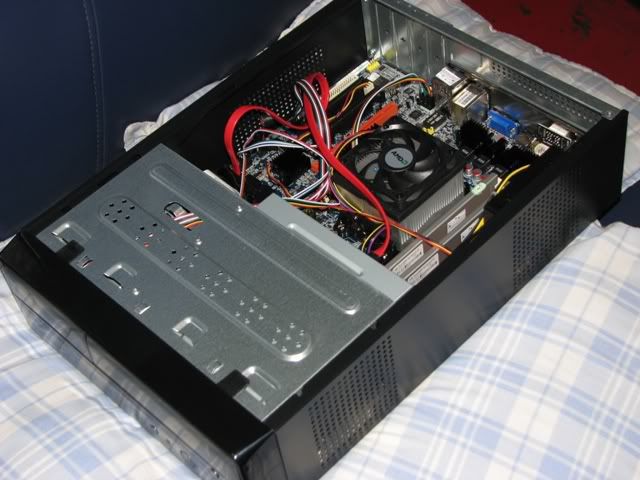
Case: Astone Enforcer Flex (SFF mATX)
Total cost as of the moment: P10.8k.
Pending items (in order of priority):
1TB Seagate HDD
MCE-certified PCI Tuner w/ remote
UPS
WiFi 802.11n USB or PCI - Haven't decided which yet. But for the moment, since this is a fairly permanent install, the on-board NIC should be more than enough for connectivity
As you can probably tell, this is far from a high-end system. But what's good about it is the AMD 780G chipset. Reading the specs, this guy is tailor made for media center applications. Originally, I was going to pair it with an AMD Athlon 4850e CPU, but it's not available anywhere I've been to. The 4850e boasts good performance but power consumption is a measly 45W, which is perfect for an HTPC... as opposed to 95W by the 7750.
The on-board GPU is also perfect for my application (playing local and online media). As of yet, I don't have any plans to play games on this system (I do have Q9550 quad-core desktop for gaming and video editing) so the HD3200 GPU is probably more than twice overkill for MCE. Among other things, it can also decode Blu-Ray for when I have enough moollah to start collecting Blu-Ray materials. That should make it somewhat future-proof for the next 3-4 years.
-
 Le Bombardier
- Join Date
- Jun 2006
- Posts
- 6,104
September 4th, 2009 08:44 AM #7I'm actually in the same dilemma.
NMTs are quite expensive actually. Around 20k+ for decent ones like TVIX 4100SH.
I just need a player for my HD files and FLAC files (growing beyond 1TB already) . I've long been waiting for a Mac Mini with an HDMI but it probably will never come. Apple instead is pushing for Displayport. I like Apple's intuitiveness and common-sense outlined structure.
I probably will go the same route as you did, an HTPC (XP and/or OSX86). It's more flexible.
-
 MU-X'ed!
- Join Date
- Oct 2003
- Posts
- 1,034
September 4th, 2009 09:45 AM #8HTPC is not for the faint of heart, but is the better way to go. Sakit sa ulo ang initial setup. Kahit simpleng optical/TOSLINK out isang linggo ako pinahirapan (AC3Filter lang pala solusyon).
I've been through the NMT route. I first had the Mediagate MG-350HD (I still have it, but collecting dust), then upgraded to the eGreat EG-M31B. Pero there's far too many HD content which hiccups with the NMT. I ended up swapping the eGreat with 2TB of HDD full of HD content, and assembled my own HTPC. No hiccups in any of my HD content. I have XBMC, WinMC, WMPClassic, and KMP as my media players. KMP gets my vote. Make sure you install the proper codecs (CoreAVC is the most important for me).
Hop on over at PinoyDVD. There are tons of thread discussions about HTPCs and NMTs there.
-
Tsikot Member Rank 2
- Join Date
- Jan 2009
- Posts
- 6,452
September 4th, 2009 09:55 AM #9Nice to know I'm not alone in this. My project is currently on hold because the case (with the PSU) hasn't arrived. I've paid for it 3 days ago but the one they had on stock had a ding on the chassis as well as a cracked bezel. If they can't deliver it today, I'm going out to look for another one at PCX.
Tomorrow, I'm going to V. Mall to look for an MCE tuner + remote combo or just the remote, whichever is available. These items, apparently, are not that common yet. The CDR-King tuners and the commonly-available Leadtek Winfast TV2000 offerings are no good for MCE because they don't have a dedicated hardware MPEG decoder. Worst case, I'm ordering these abroad.
In the meantime, I can buy one of the CDR-King wireless mini keyboard with a built-in trackball (http://www.cdrking.com/local/product...268452-2836971). My bro uses one in his room and it seems to perform decently.
Well, these are the sort of things you'll avoid when you just go out and buy an NMT. But then I realized, where's the fun in that? :D
-
Tsikoteer
- Join Date
- Oct 2002
- Posts
- 29,354
September 4th, 2009 10:52 AM #10I was thinking of buying the CDR-KING wireless kb with trackball as a backup keyboard for my current wireless keyboard with joystick mouse. Originally Posted by oj88
The one I am currently using (for years) is this one:
http://www.btc.com.tw/english/news_15.htm

It's great to use with it's ergo shape, full sized keyboard, media keys and a set of programmable buttons.
Unfortunately it's long been discontinued because it's obsolete (and I can't find anything similar to it locally anymore).
The bright side, BTC have two newer designs (but not available in the Philippines):
http://www.btc.com.tw/english/2-7-30...htm#9039URFIII

http://www.btc.com.tw/english/2-7-21...htm#9039URFIII

-
Tsikot Member Rank 2
- Join Date
- Jan 2009
- Posts
- 6,452
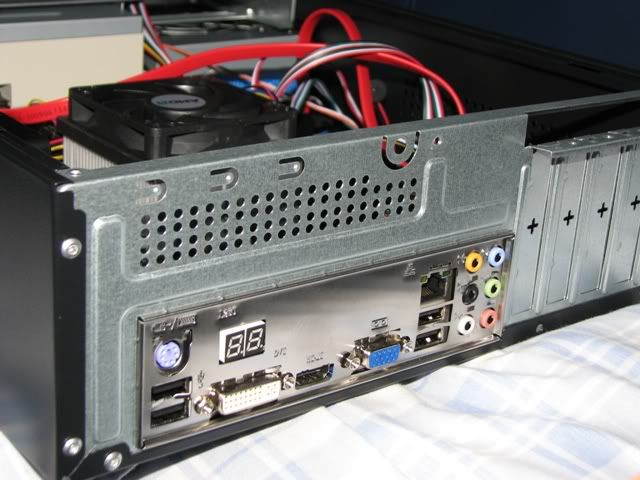
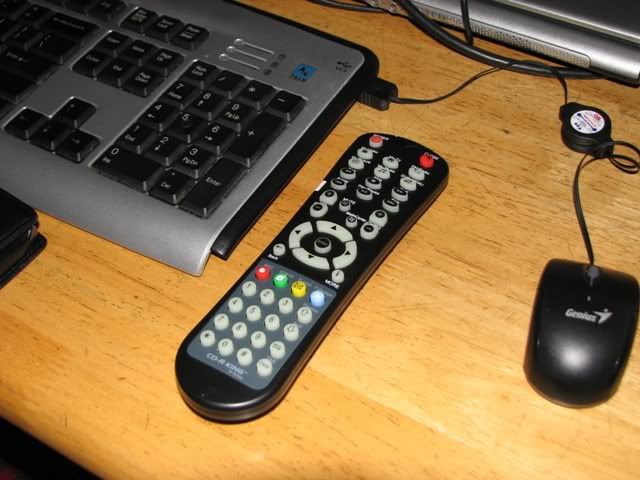
September 5th, 2009 05:13 PM #11Well, I finally finished my HTPC. It's not really 100% done though, it's already fully-functional. Too bad the mini wireless keyboard is out of stock at CDR-King, but instead, I got me a knock-off MCE remote (with USB IR receiver) for P380!! Works well, except for the skip buttons which is a bit weird so I'm still trying to figure that out.
As mentioned, it's not 100% finished as I'm still missing a proper tuner. It's damn hard to find a branded one that's certified for Vista/Win7 MCE. That, and a big-ass LCD panel.
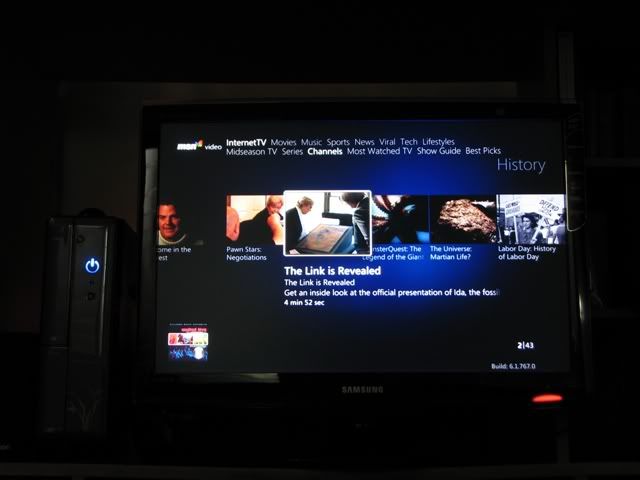
Anyway, I have to go somewhere in a while so I'll just leave you with the pics. Excuse the 20 year-old TV. Too bad these Sony's are built to last. :D
-
Tsikot Member Rank 2
- Join Date
- Jan 2009
- Posts
- 6,452
September 5th, 2009 05:15 PM #12Cont'd.
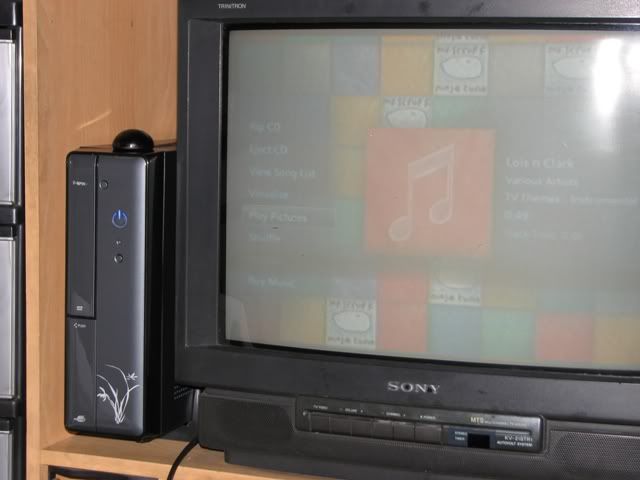
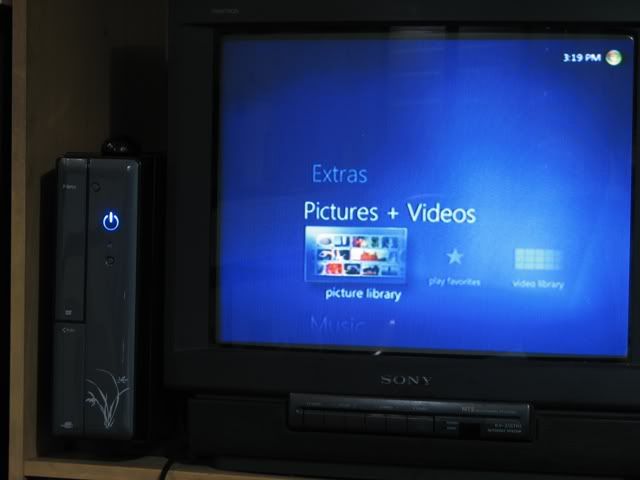
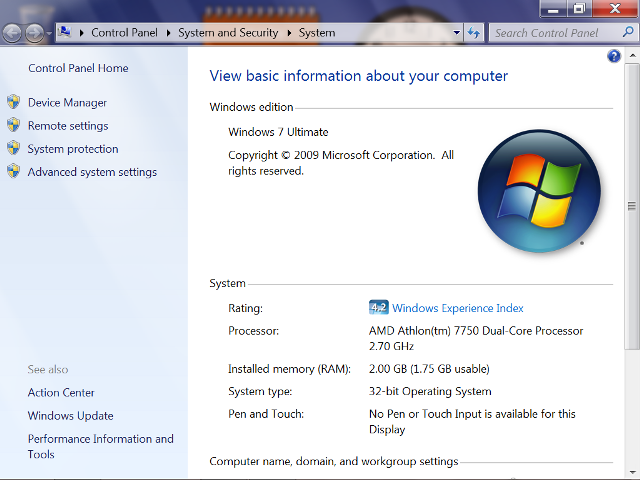
Not bad for a system that just cost a little over P11k. I'm glad I went this route. Going for a PCH or E-Great box costs about the same but with half the capability of an HTPC. I'm happy!
-
Tsikoteer
- Join Date
- Oct 2002
- Posts
- 29,354
September 5th, 2009 05:35 PM #13Actually the cost would be near to P15K if I was to plug in the cost of a 1TB HDD.
-
Le Bombardier
- Join Date
- Jun 2006
- Posts
- 6,104
September 7th, 2009 02:52 PM #14Just stick with Logitech. You can get Logitech DiNovo or DiNovo Mini. Both come with touchpads.
I'm sure there are other cheaper brands like cdrking but you practically get what you pay for.
Your Sony tv is still nice though it's time to upgrade to a Bravia to properly view HD material. Believe me, you'll never look back. After viewing HD, you will think what a crap original DVDs are. hehehe
Question: how is the heat off the AMD proc?
-
Tsikoteer
- Join Date
- Oct 2002
- Posts
- 29,354
September 7th, 2009 02:57 PM #15The DiNovo keyboards are nice but also very expensive. I got my BTC current wireless keyboard for under P2000. It might not be as high tech (no touch pads) but it give me all the wireless access I want. Originally Posted by Horsepower
-
Le Bombardier
- Join Date
- Jun 2006
- Posts
- 6,104
September 8th, 2009 11:26 AM #16GH, true, logitech diNovo are nice (super nice in fact) but expensive. But think of it, Keyboards are what we usually touch all the time. I am quite particular with keystrokes and typing experience that's why I hate no-brand keyboards because they tend to get sticky, doesn't give that right amount of key spring which ruins my input (I'm a touch typist), keys aren't nice to touch, often ugly, etc.
BTW, there's a wireless Logitech kb+mouse for under 2k too.
-
Tsikoteer
- Join Date
- Oct 2002
- Posts
- 29,354
September 8th, 2009 12:09 PM #17But having two devices instead of just one makes it harder to use. Example, I am watching my movie in my lazyboy couch. I honestly do not want to hassle myself with a separate keyboard and mouse. I prefer it to be in one "module". Hence, the BTC keyboard with joystick mouse I am currently using. Originally Posted by Horsepower
Given the only options at the moment in the local market is the DiNOVO and the CDRKING wireless keyboard/mouse ... I feel I might be buying a DiNOVO when my current keyboard dies.
-
Tsikot Member Rank 2
- Join Date
- Jan 2009
- Posts
- 6,452
September 8th, 2009 01:05 PM #18Also a recent Logitech convert. I bought one of their of illuminated keyboard for my main desktop. It's not cheap for the thing it does but the quality and build was top notch. It's blade-thin, and the "crystal" edges went well with the Samsung P2370 monitor on my desktop.. it's like they were made by the same company and for each other.

Going back to my HTPC, I don't do much typing (maybe 1-2% of the time) and only if I need to do some on-the-fly maintenance or setup. Most of the control is done using the MCE remote. For that reason, I wouldn't need an uber expensive keyboard + trackball/pad combo. Not yet anyway. So for me, the wireless mini keyboard from CDRK fits the bill.
Added just yesterday:
A Samsung T240HD (Hey, it's not a big room) and a Xenon AX-302 2.1 multimedia speakers. This is not the "ideal" HT setup in my dreams but compared to the Sony boob tube of two decades old, this is like showing up with a digital watch in the 50's.
I don't have actual pictures of the sub so I have to borrow photos from another site:

The 302 kinda surprised me with its excellent sound. Further, I had to set the bass to 50%, or else things in the room clatters with it. This blows my main desktop's Altec Lansing ATP3 out of the water. If I'm ready to spend for a 5.1 or 7.1 on my HTPC, I'll replace the ATP3 with the 302 for gaming and stuff.
-
Tsikot Member Rank 2
- Join Date
- Jan 2009
- Posts
- 6,452
September 8th, 2009 01:35 PM #19Sorry, I must've missed this one. CPU core temps are in the mid-40's (Centigrade) when loaded. 40 when idle. This is using the HSF that came with the processor package. However, the power supply is a bit hotter than I expect it to be. Maybe it's because of the PSU fan pushing air outwards and downwards towards the bottom (the PSU in this ITX/mATX case is at the bottom and in front) and fighting the natural flow of hot air to go up. Originally Posted by Horsepower

 Reply With Quote
 Originally Posted by ghosthunter
