
i recently bought a laptop... i noticed that the bottom portion really gets hot... is it necessary to have a cooling pad? TIA

The Largest Car Forum in the Philippines
- Forums
- Discussions
- Events
- Community
Results 1 to 20 of 23
-

 Tsikot Member Rank 3

- Join Date
- May 2007
- Posts
- 2,127
April 8th, 2009 07:16 PM #1
-
 Одна из черт возьми
- Join Date
- Oct 2002
- Posts
- 15,528
-
 Tsikot Member Rank 4
- Join Date
- Jun 2006
- Posts
- 2,027
April 8th, 2009 08:47 PM #3I just bought an aluminun-type notebook holder. Works ok and cheaper too.
Last edited by Negus; April 8th, 2009 at 09:34 PM.
-
 Tsikoteer
- Join Date
- Oct 2002
- Posts
- 29,354
April 8th, 2009 11:27 PM #4not necessarily a cooling pad. You can use anything that can lift the back or whole laptop off the table to give it an extra space under it for better ventilation. Even an old pelota ball cut in half is handy to prop up the rear of a laptop. Originally Posted by liv

-
 Batang GAPO 2
- Join Date
- Sep 2005
- Posts
- 377
April 9th, 2009 12:39 AM #5 Originally Posted by 1D4LV
+1...i am using the transparent one.
sir kung Intel Celeron lappy mo normal po na malakas mag-init.
OT....sir 1D4LV did u check the direction of airflow? sa akin pabuga before but binaliktad ko kci dapat hihigupin nya ung heat pababa/palabas ng lappy.
-
 Dynamic Tsikoteer
- Join Date
- Aug 2005
- Posts
- 2,343
April 9th, 2009 07:12 AM #6I use one. The cheapest from CD-R King with two fans. It does do its job

-
Tsikoteer
- Join Date
- Jun 2008
- Posts
- 329
April 9th, 2009 09:11 AM #7a cooling pad adds stress to the psu of the laptop unless you use those usb-power outlet converter
-
Одна из черт возьми
- Join Date
- Oct 2002
- Posts
- 15,528
-
 Tsikot Member Rank 3
- Join Date
- Mar 2005
- Posts
- 1,011
April 14th, 2009 02:48 AM #9sometimes they do more harm coz they interfere with the normal airflow of the internal cooling fans
-
 Tsikot Member Rank 3
- Join Date
- Oct 2005
- Posts
- 780
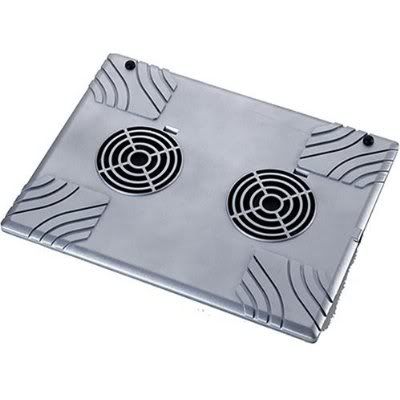
April 14th, 2009 10:32 AM #10Targus cool pad for my Dell Laptop, works great, 2 fans sucks air away and to the back, USB and you can't tell if it is on or off, very silent, low profile and matches the color of my Inspiron 1420. It will add about half an inch to the thickness of the your laptop.
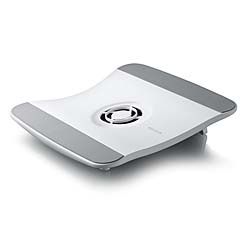
On the other hand, I bought the Belkin cool pad for my wife's HP dv2715nr. Not only it blows air towards the laptop, it is very noisy couldn't stand it!!! single fan, USB and doesn't have on/off switch. Not low profile, it is curve and if you don't pull the rear stand it will rock back and fort. It will add about 2+ inches to the height of your laptop. Wife doesn't use it.

Last edited by Camgen6; April 14th, 2009 at 10:39 AM.
-
 Roadie
- Join Date
- Aug 2007
- Posts
- 820
April 14th, 2009 11:32 AM #11Ok...so yung pahigop palabas is better than pabuga to the notebook is better. I though my notebook cooler is blowing air reverse. Originally Posted by ruelsdcz
 . Thanks!
-
Tsikot Member Rank 3
- Join Date
- Oct 2005
- Posts
- 780
April 14th, 2009 12:37 PM #12Yeah dapat ang cooler pad eh sucks hot air away from your laptop. Originally Posted by DonT
-
Tsikot Member Rank 3
- Join Date
- May 2007
- Posts
- 2,127
April 14th, 2009 08:31 PM #13 Originally Posted by Camgen6
it's a good thing that i didn't buy this although i have a discount coupon for the Belkin cooling pad... i might end up not using this also if it's that noisy.
-
 Tsikoteer
- Join Date
- Dec 2007
- Posts
- 3,938
April 15th, 2009 06:14 AM #14Only if : Originally Posted by liv
1. you can tolerate the additional bulk (and weight) in your bag
2. the 15 or so minutes less battery life (when untethered, of course) is fine with you
3. the noise is tolerable
4. (NOT RECOMMENDED) your laptop/notebook PC's fan got busted and it can't be fixed RIGHT AWAY and you need to use the laptop
5. you have to use the pc on your lap/stomach (I rarely do, it restricts my movement, but when i do, i use a box or some other flat material to shield my skin from its heat and to prevent blocking its airflow)
HTH.
-
 vivent secretement
- Join Date
- Feb 2007
- Posts
- 1,279
April 15th, 2009 10:06 AM #15I know someday I will be needing to fight the heat that's been coming out of my notebook.
After looking at the different cooling products out in the market, I find it too impractical to buy something that will just add bulk and defeat portabilty of my computer.
So I ended up buying Laptop legs by LapWorks. Here's what it looks like:
http://the-gadgeteer.com/2005/04/14/...p_legs_review/
It may not be for everyone's needs but it fills mine to the T.
-
Tsikoteer
- Join Date
- Dec 2007
- Posts
- 3,938
May 31st, 2009 06:41 AM #16^^^ Too expensive for me.
BTW, aren't they too thin to use on your lap for extended periods? I'm thinking they'll leave deep marks on my thighs.
-
Roadie
- Join Date
- Aug 2007
- Posts
- 820
May 31st, 2009 07:37 AM #17I have been using mine for years like this..and my 3 yr old notebook does not exhibit any signs of stress.. Originally Posted by jozef_10
However, I tried installing an external powersupply, but since I use the 4 USB port included in the cooler, I am not sure if it is really using the external power supply instead of the Notebook's USB power.
-
Tsikoteer
- Join Date
- Dec 2007
- Posts
- 3,938
May 31st, 2009 07:49 AM #18Doesn't that interfere with the normal airflow of your laptops? Originally Posted by DonT
The normal flow is this: COOL AIR is sucked IN through the air vents on the bottom, which goes through the ducts and out the side vent/s. If you reverse the airflow of your cooling fans, you'll be interfering with the normal airflow. Why not just help the laptop's fan/s? After all, the residual air will go out the sides anyway.
My 2 cents.
-
Roadie
- Join Date
- Aug 2007
- Posts
- 820
May 31st, 2009 08:29 AM #19I also thought it was that way..but it does makes sense. The Notebook's fan fools the CPU of the notebook by sucking air from the bottom of the Notebook. Therefore, the cooler the air at the bottom of the notebook..the better it is. Either putting the notebook inclined or giving more space at the bottom will also do the trick. Laptop coolers will do it better. Originally Posted by woohoo
Now, if the laptop cooler is blowing (instead of sucking) air into the bottom of the notebook, there is a tendency for dust to accumulate at the bottom and clog the inlet of the notebooks fan.
-
 Le Bombardier
- Join Date
- Jun 2006
- Posts
- 6,104
May 31st, 2009 01:27 PM #20It also helps to clean your laptop's cooling system by opening it up and cleaning its parts.
After a while, all that compacted dust will form into cotton-like things blocking the airflow.

 Reply With Quote
 Originally Posted by liv
