
para mabilis at ang set up latest na kaya 50k yun.CPU lang bibilhin ko oks na muna itong monitor.

The Largest Car Forum in the Philippines
- Forums
- Discussions
- Events
- Community
Results 21 to 40 of 42
-

 GEARSPEED Lets Go!!!

- Join Date
- Dec 2003
- Posts
- 5,847
October 28th, 2013 09:55 PM #21
-
 Fix Or Repair Daily
- Join Date
- Sep 2013
- Posts
- 1,832
October 28th, 2013 10:03 PM #22LOLZ worth 50k na desktop mahal nun dude
makakabili kana worth 15k lang super bilis na pwde
na makapaglaro ng pang PS4 na games :hysterical:
kung ako sayo bili kanalang ng imitation after 3 years lang laos na
bibili ka pa ng worth 50k then after 3 years laos na din e di sayang lang pera mo :hysterical:
tabi mo nalang pera mo na sobra pagawa ka ng maraming humps sa harap ng bahay nyo
para hindi bumarurot si pampam mo hehe
-
Tsikoteer
- Join Date
- Aug 2003
- Posts
- 9,720
October 29th, 2013 03:10 PM #23hmm, any shop selling Intel processors should have them sir. PC Express meron. Originally Posted by oj88

-
 Boobs Make Me Happy
- Join Date
- Aug 2010
- Posts
- 3,527
October 29th, 2013 03:52 PM #24The 70K is within expectation as that's also the cost of my previous P4 Prescott rig. Originally Posted by gearspeed
I see you enjoy your computers naman so I'll be pitching in na rin.
1. For your GPU, a budget of <10,000php is ideal. The cheaper you go, the more cost-efficient you are in depreciation. Unless you plan on playing the latest games at their highest resolution, 5,000php is more than enough.
2. No RAID setup. It's too complex and not worth the added cost. I'd suggest a 128GB SSD + 1TB HDD combination instead. For the SSD, you can opt for budget drives such as ADATA SP900s or go for the more mainstream ones - OCZ Vertex 4s, Samsung 830s, etc. Personally, I use two 128GB OCZ Vertex 4 however our office PCs are using 64GB ADATA SP900s for their budget meals. I wouldn't worry about the benchmarks as, in real-life, you'll be hard pressed to feel a massive difference in 300MB vs 500MB seq reads. However, the jump from traditional HDD whether 7200RPM or 10,000RPM to SSD will be humongous.
3. Memory is a well.. depends. The rate by how memory progresses is simply astounding. As you built your P4 rig, dapat alam mo yan. 128MB was the "norm" then when I got 512mb. Fast forward a few years, 1GB was the "norm" in 2008 when I built my C2Q rig with 4GB. Now, 4GB na yun "norm" so I suggest 16GB of DDR3 1033mhz.
Why the allowance? Because phased-out RAMs are expensive. DDR2 now is selling 2-3x more than their 2008 counterparts thanks to limited supply. So while you can, stock up.
Why not a faster ram or lower latency? Not worth it for the price-performance you're getting. So stick with a lower speed... but just add to the amount.
4. For the DVD-ROMs, well. To each his own nalang yan. I'm not a fan of internal cd drives as I find most of them stop working after two years or so. Not to mention that I'm just using them occasionally. Eventually, I opted for an external cd drive reader instead which I find very convenient just in case I need to install something on the go (ex. laptop, office PC at another site, etc.)
5. For the OS, sanay ka na ba? Almost all models nowadays ship with Windows 8, but I still find Windows 7 attractive enough for the back-to-roots type of computing. I know my way around Windows 8 but I'm finitely more comfortable with Windows 7 and so does our office staff and this is why I support Windows 7 over 8.
6. For your motherboard, that also depends on your taste. As an enthusiast kasi I don't compromise on my mobo. However I simply suggest a get-what-you-need type for most. First is you need to know which chipset you'll be going for.. these are the Z77, B75, etc. (LGA 1155 - Wikipedia, the free encyclopedia look under Ivy Bridge chipsets). As for the brand, I'm not brand-loyal naman as most of these are well-reputed na. ASUS has a reputed following in their motherboards but MSI is also cost-competitive. ECS is locally manufactured and should be more affordable than their foreign counterparts.
7. For the PSU, Seasonic is very well-reputed but is quite pricey. I suggest you stick to something like Corsair who still has their reputation behind them but isn't going for prestige pricing of their products. For the enthusiast, usually rail power tinitignan mo but overall power isn't bad so look for around 600W as I find that's the most ideal PSU wattage nowadays with headroom for future upgrades. As a previous Tsikoteers says, you don't really need 1000W but it can't hurt too if that's your thing. Personally, I'm using Thermaltake's ToughPower 1000W (because I got it cheap and it's modular) but most of our office PCs use Corsair VS450 as their basic entry.
As to where you'll purchase them -- GIlmore. Banawe is to cars as Gilmore is to computers. PC Options typically offers the lowest pricing and I've built two of my rigs from them but lately, I find myself being a repeat customer of PCHub. If you'd like I could probably construct a PC for you at that budget.. but you'll have to wait probably later tonight or on Nov 2 -- whenever I'm free
-
GEARSPEED Lets Go!!!
- Join Date
- Dec 2003
- Posts
- 5,847
November 30th, 2013 04:49 PM #25Habang pinapagawa ko yung laptop nung isang araw ito nakita ko sa pc store nila.
Intel i7-4770 8,660(can't remember the complete price) mas mataas na kukunin ko sinabi nung friend ko na i7 ang bilhin ko.
Asus 13,000
Sparkle Geforce 660TI 16,450
WD 1TB hard disk 3,700(Panget na daw seagate sirain daw)
Lite on lang na DVD writer meron sila.
Modem hindi ko nacheck kung magkano sa kanila.
PC casing 4,500-5,000.
Kung ganun pa rin price nung motherboard at video card kukulangin yung 50k.hehe.
Magtitingin pa ako sa ibang pc store.Last edited by gearspeed; November 30th, 2013 at 04:55 PM.
-
Tsikot Member Rank 4
- Join Date
- Oct 2002
- Posts
- 2,719
November 30th, 2013 05:58 PM #26modem? hindi na uso yan Originally Posted by gearspeed
bilisan mo na bumili ... baka abutan ka ng i100
-
 Tsikot Member Rank 5
- Join Date
- May 2006
- Posts
- 8,357
November 30th, 2013 08:44 PM #27yung i7 4770 15k+ presyo niyan Originally Posted by gearspeed
10k+ lang pinakamahal na Asus board
Sparkle video card saksakan ng panget! daling masira! Palit ang matibay
WD 1TB green ang kunin mo
Lite On ok yan nag burn ako ng mahigit 500 CD di pa bumibigay
modem? wala ka bang DSL?
Casing? nakakatulong bang bumilis yung setup mo niyan?
mag windows 95 ka siguradong napakabilis boot up niyan
-
 Dalek
Dalek
- Join Date
- Dec 2006
- Posts
- 17,314
November 30th, 2013 08:56 PM #28Hi Gearspeed, the first question I ask anyone who wants to build a PC is this -Para saan mo gagamitin?
It's important to know the purpose of the computer so you don't buy anything you don't need, and also so that you don't scrimp on the important components.
You weren't very clear on this PC's purpose, but based on your posts, here's what I infer:
- You want a PC that will last several years before being outdated
- You're not exactly a PC enthusiast (if you were, you wouldn't have to ask here) and you don't overclock either
- You're not really into PC gaming, or if you are, not to the extent that most PC enthusiasts play
- The PC will be for used primarily for menial tasks (office work, watching movies, internet surfing, ****) with perhaps the occasional photo/video editing and gaming
If I'm wrong with any of these assumptions, please correct me so I can revise my recommendation for you.
With that in mind, here's what I suggest:

Prices and parts are from PC Hub Gilmore
Of course, you'll be asking, "why those parts?"
I'll try to be as simple as I can:
* CPU: Let me make it clear - YOU DON'T NEED AN i7. The difference between an i5 and an i7 is Hyper-Threading, or virtual cores. Unless you do a lot of video editing, you don't need it, not now, not in the next 5 years. The i5-3470 is immensely powerful as it is, and will definitely last you a long time.
* Motherboard: The only reason I see to buy an expensive motherboard is if you overclock, which you probably don't do. Cheaper boards aren't exactly less reliable. AsRock is a subsidiary of Asus and is the 3rd largest motherboard manufacturer in the world. They wouldn't have gotten there if their products weren't durable. The H77 Pro4 already has all the features you need in a board.
* RAM: RAM is expensive nowadays, and the sweet spot is 8GB RAM. Average users don't need more than 4GB yet, so 8 GB is future-proof for you. You can always add 8 GB more for a total of 16 GB should the need arise, and by that time DDR3 would be cheaper. The Crucial Ballistix Elite is already high-frequency, low-latency RAM - that means it's better than the RAM that most other people have.
* Video Card: The Radeon 270X is a video card that can play ANY game in FULL HD. It can even play most games on a tri-monitor setup without a sweat. It's very future-proof and will still be useful for games in the next 5 years. If you don't play lots of intense games (i.e. Crysis 3, F1 2013, etc), you probably don't even need it, you can use the built-in graphics of the i5 which can handle simple games like DoTA 2, Sims, or whatnot.
* Hard Drive: Get a 2TB hard drive since it's not that much more expensive than a 1TB. Simple as that.
* SSD: SSDs make the biggest difference in your PC's responsiveness (boot time, application loading time, etc). You only need 120GB because you will only be installing your OS and most used programs here, and 120GB is more than enough. Your videos and music should go to the 2TB hard drive.
* Power Supply: Seasonic is one of the most renowned PSU brands world-wide, and they produce high-quality PSUs. Gold PSUs are still expensive and you don't need them. Their S12II Bronze rated PSU is virtually as good for only half the price.
* Case: The Bitfenix Shadow looks good and has great cooling. Here's how it looks:

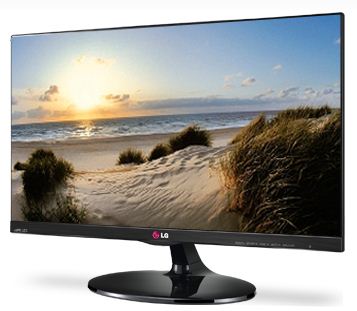
* Monitor: The LG 23EA63V is an IPS monitor, which means it has much better colors than the usual monitors other people have. It's also wall-mountable if you're into that. Looks great too:
* DVD Drive: As jhnkvn mentioned earlier, barely anyone uses these now. It's much better to have an external drive that you only plug-in when the need arises. Plus, you can use it on your laptops or other PCs too.
Overall, this is a PC build that will last you a long time before being obsolete, and has all the essential parts with none of the fluff you don't need.
Just my 2 cents. Hope this helps.
Last edited by jut703; November 30th, 2013 at 09:02 PM.
-
GEARSPEED Lets Go!!!
- Join Date
- Dec 2003
- Posts
- 5,847
December 1st, 2013 03:24 PM #29Thanks sa tip sir.
Panget pala nung sparkle spark sira pala yun kung ganun.hahaha.
Hanap muna ng ibang video card.Yung Inno 3D 32k kaso sold na.
Yung nakita ko na isang Asus motherboard na worth 16k sabertooth yung isa pala 9,500 WM7 or W7 ata yung model na yun.
Sir jut703 for gaming,pag kailangan mag photoshop,multipurpose na pc atbp.
Tsaka para mabilis din kaya ganun ang naset ko na worth yung custom pc.
Yung 70k na old pc namin hanggang ngayon gumagana pa yun nga lang mabagal na.
Ang pinalitan lang namin dun ay hard disk,video card at yung power supply.
Baka dun na lang ako sa dati kong binilhan ng pc.Last edited by gearspeed; December 1st, 2013 at 03:26 PM.
-
Dalek
- Join Date
- Dec 2006
- Posts
- 17,314
December 6th, 2013 01:23 AM #30Yung sinuggest ko GS, sobrang lakas niyan sa gaming. Like I said, all performance parts with no fluff. Originally Posted by gearspeed
Just to clarify with you, Sparkle and Inno3D aren't video card makers. Only AMD and nVidia make cards - these companies simply package them and tweak a little. Mas importante pa rin kung ano yung reference card.
Also, why in the world are you looking at the Asus Sabertooth. That's intended for overclockers, yung mga nangangalikot ng PC nila magdamag to get the best clock speeds possible. Spending 16k on a board is stupid if your other parts aren't as high-end, and lalo na if you don't know how to maximize the board din naman.
It doesnt mean that a PC is expensive, it's fast and built to last. I can easily make you a 70k build with all fluff and fancy highend parts, but is actually slower than a good 30k PC. And that's what a lot of PC shop salesmen do - sell you their most expensive item because they know youre the type to believe that expensive = fast. Try to avoid such purchases para di sayang pera mo
Sent from my iPad using Tsikot Car Forums
-
 BANNED BANNED BANNED
- Join Date
- Nov 2005
- Posts
- 2,372
December 6th, 2013 01:47 AM #31it doesnt mean expensive, it is powerful. hahahaha.
GS, GS, GS, o boy. praying you have a life.
-
 Tsikoteer
- Join Date
- Aug 2012
- Posts
- 967
December 6th, 2013 03:11 AM #32pabayaan nyo nalang sya bumili ng mahal na yan, para wala ng pambayad ng internet. ehehe
------------------
I am the highway...
-
 Super Saiyan
- Join Date
- Jul 2011
- Posts
- 705
December 6th, 2013 05:28 AM #33jut073 and jhnkvn are actually pointing the same thing - buy quality parts that fit your needs.
You don't have to build a 100K gaming PC just so to prove that you have the highest-end PC, because it will be easily outdated after 6 months. At the rate of PC hardware R&D, it is very hard to have the a high-end computer for more a few months. They will always invent/produce something newer, faster and higher-end than what you have.
Also, for a casual gamer like you I suggest not spending more than 40K as this price is the usual bracket as per your needs.
IPS (in-plane switching) give the user a wider angle of view of the monitor. Think plasma-like viewing angle.
It doesn't necessarily have a more boosted color gamut compared to normal LED/LCD monitors.
It is, however, more expensive to produce and takes a bit more power than conventional monitors.
-
BANNED BANNED BANNED
- Join Date
- Nov 2005
- Posts
- 2,372
December 10th, 2013 07:18 AM #34Nakabili ka na ba sir? For delivery? Or what?
Sent from my GT-I9300 using Tsikot Forums Mobile App mobile app
-
Dalek
- Join Date
- Dec 2006
- Posts
- 17,314
December 11th, 2013 01:43 AM #35I agree with you bro, inherent benefit of an IPS over TN panel is really just the viewing angle. But at the mainstream price range, IPS panels tend to have better colors compared to their similarly priced TN counterparts. Originally Posted by greatauror28
Main advantage of TN is still faster response time (mainstream IPS still peaks at 5ms while 2ms with TN is common). Though from my experience, the response time of an IPS panel (tried LG) is fast enough not to cause ghosting even with FPS games. Main drawback though is that lots of IPS monitors still have backlight bleeding. The newer LGs and Dells dont though..
Sent from my iPad using Tsikot Car Forums
-
Carpe Diem
- Join Date
- Aug 2009
- Posts
- 2,071
December 11th, 2013 09:42 AM #36A rig worth 50 thousand will already make you a happy BF4 camper heheh.
-
Boobs Make Me Happy
- Join Date
- Aug 2010
- Posts
- 3,527
December 25th, 2013 02:37 PM #37jut703's quotation is very nice. In fact, I construct pc rigs on the same mindset.
Except, I'll jump for the i7 4770 (+4,000php), drop the DVD drive (-1,500php), change the monitor to ASUS 23" VX239H IPS (-2,100php), then I'll throw a CPU cooler like CoolerMaster Hyper T4 (+1,500php) into the mix.
Casing is more of personal taste.. but I'll highly recommend NZXT's Phantom 410. Why? Because it looks cool. That's all.
Okay, I'll delve into the analogy on my changes:
1. Tama naman si jut regarding the i5 and i7. However, 4,000php is something I will pony up for the Hyper-threading technology. It's much like why people pony up cash going from Intel Pentium G3000s to Intel i3s. The CPU isn't easily replaceable unlike a GPU which relies on PCI slots.. years from now and you want a new CPU, you'll probably be needing a new motherboard because you need a new socket to throw it in. You might not do video encoding a lot.. but it doesn't matter because you'll probably be doing uncompression, encoding of music and videos, etc. as part of your everyday PC routine. And once you load Photoshop, then all the more better. A lot of softwares nowadays are able to utilize multi-threaded processors nowadays and I expect the trend to continue.
2. No DVD drive. If you need to install something, use a USB. Faster, silent, and you can abuse it without much worry.
3. I'm actually eyeing this monitor as well as a Dell 23" IPS monitor. The jump of 23" to 24" is still too big for my taste and so the sweet spot in buying monitor sizes nowadays is at 22" to 23". This ASUS monitor looks better in person ;) and I have every plans on buying them bulk once I start revamping our computers in our office (yes, office. I spoil my partners a lot.. heck, all of our newer PCs comes with SSDs as standard nga eh)
4. For the cooling.. this is actually a semi-unnecessary expense. But I'll throw it because aside that it looks damn-better than the stock Intel fan, it also serves a purpose by lowering your general idle temperatures. Amd once you start loading the computer.. it will truly shine over the stock CPU fan ;)
For the RAM, I'm still torn. Personally if you're budgeting 70 grand on it.. I'll still go for 16GB for future-proofing sake. RAM prices won't go down.. once DDR4 kicks in at 2015 and becomes mainstream by 2016, the prices of DDR3 will skyrocket thanks to supply constraints (manufacturers are churning out DDR4.. not DDR3). That's why I'll go for 16GB because aside from the added headroom.. you also have "allowance" just in case one of your ram sticks goes bonkers (quite rare.. but it does happen).
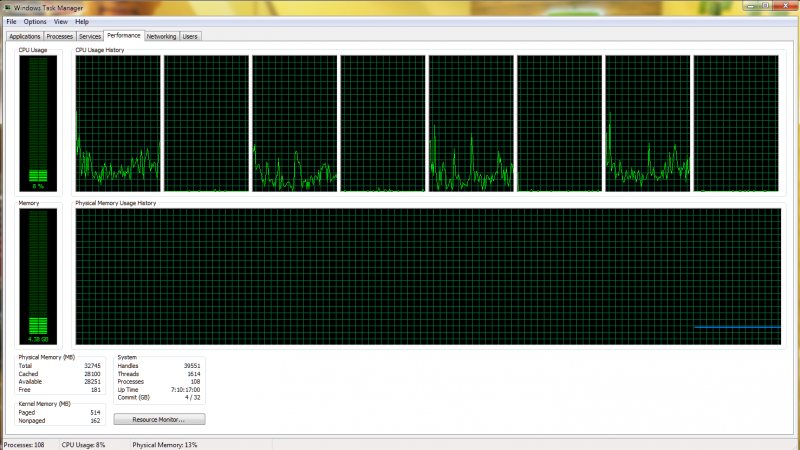
Truthfully, my "everyday" RAM has already exceeded 4GB. That's on a fairly multiple-tabbed Chrome, foobar2000 playing my music, and u******* downloading some animes.
-
Dalek
- Join Date
- Dec 2006
- Posts
- 17,314
December 26th, 2013 01:18 AM #38For good looking coolers, I think a liquid setup is still cooler (pun intended hahahaha).
Pogi nung Cooler Master Seidon 120V! And cheap too at only 2.5k, as good as the Corsair H60 of last year for 1k less.
From my experience, more cores pays off in the long run, but this goes against my feeling that program developers will stop at 4 cores for the near future. I haven't seen many programs benefitting from 8 cores despite the fact that the i7 has been around for several years, as well as AMD's low cost true octa-cores.
But just to share, I had a Core 2 Duo setup before. It was fast for about 4 years, until it began bottlenecking my PC's performance, whether it be gaming or Photoshop. Selling it and buying a used quad-core (from E6550 to Q6600) improved usability a lot. As jhnkvn said, you can avoid the hassle of changing processors by going for the one with more cores now as this might pay off in the future.
Sent from my iPad using Tsikot Car Forums
-
Boobs Make Me Happy
- Join Date
- Aug 2010
- Posts
- 3,527
January 14th, 2014 11:26 PM #39The CM Seidon received too much bad user reviews for it for me to recommend it. Personally, I'm also using a closed-loop liquid cooling setup on the premise of a cleaner setup. Truthfully, my initial plan was to go for a Corsair H100 but I eventually settled for ThermalTake's Extreme since sobrang in-demand yun Corsair and finding stocks at that time was hell. Originally Posted by jut703
I'm also worried about closed-loop cooling longevity-wise.. this is why I opted the use of air-cooling (CM Hyper T4 ranks high on my budget coolers and I use it extensively) on our company servers where they're known to last for decades. Hell, may Pentium 2 pa kami na PC
-
 Tsikoteer
- Join Date
- Apr 2010
- Posts
- 384
January 23rd, 2014 03:32 AM #40Nagsawa na ko sa ganito. Go get a laptop or a MacBook! You won't regret it and will never go back. :D
Sent from whatever device I got my hands on via Tapatalk

 Reply With Quote
 Originally Posted by oj88


