
I've always been a fan of gaming mice. And I don't play games.. but it's just because of ergonomics. If I'll be using it for more than 2 years, the price is more than worth it.
My very old Logitech G500 (bought just months from release), Thermaltake BMWDesignWorks Level 10 Mouse, Corsair M65.
The Logitech I had to phase out thanks to double clicking issues. It'll be subjected to the operating table or I'll probably have a mini electronic shop try to repair the springs/switches inside. The Thermaltake's for-home-use mouse. I simply wish that it had adjustable weights as it's a tad too heavy in my opinion. The 3D orientation using the allen wrench is simply awesome.. who knew 5 degrees would make such a big difference. The Corsair is for my office-only use. It's less flashy and arguably has better ergonomics than the BMW Mouse. I had to remove two 5g weights at the front to shift the center of gravity near the back of the mouse. It's just perfect in the weight department for me.
In any case, I simply require a DPI of around 3000. Anything more and I'm pissed at how fast it's going, anything less and I'm complaining about lack of response and precision.

The Largest Car Forum in the Philippines
- Forums
- Discussions
- Events
- Community
Results 61 to 80 of 90
-

 Boobs Make Me Happy

- Join Date
- Aug 2010
- Posts
- 3,527
September 27th, 2013 11:55 AM #61
-
 Active Tsikoteer...minsan
- Join Date
- Dec 2004
- Posts
- 439
April 4th, 2016 09:29 AM #62 Originally Posted by jhnkvn

Saw this one from Razer...looks like a mouse designed by A-Toy.
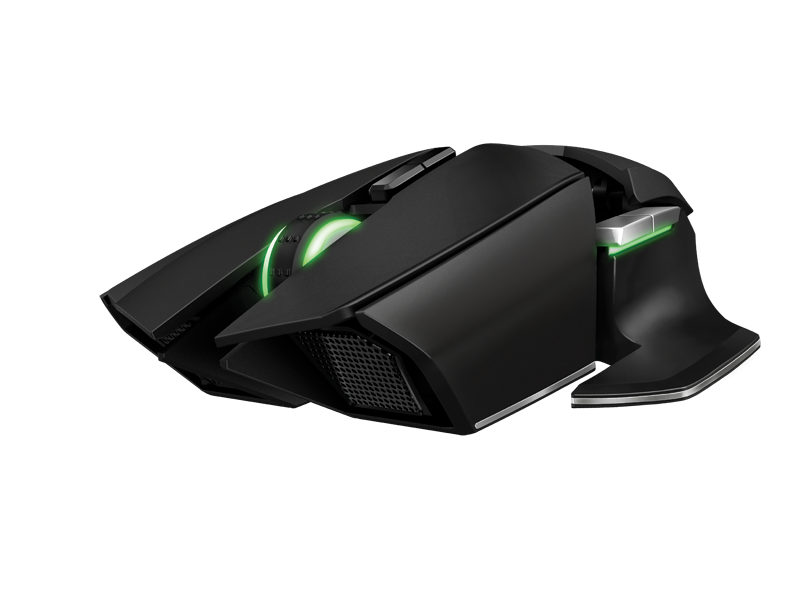
Razer Ouroboros Gaming Mouse – Wired / Wireless Mouse for Gaming
-
 Verified Tsikot Member

- Join Date
- Jan 2016
- Posts
- 6,813
April 4th, 2016 09:56 AM #63Anyone experiencing mouse issues with windows 10? Mine started when I noticed my old mouse was was already skipping, or erratically responsive. I replaced it with my A4 Tech from an old laptop with win 7 and it won't work except for the scroll button? Will buy a new one once I have the time, but meanwhile i'm using the touchpad, medyo hirap lang ako mag-adjust sa synaptics. Baka kasi meron sa inyong me alam ng fix para dito. Thanks.
-
 Verified Tsikot Member
- Join Date
- Jun 2009
- Posts
- 2,515
April 4th, 2016 06:54 PM #64I do find wireless mice performance an iffy under Win10. Somehow several of my my wireless mice just freeze. Originally Posted by papi smith
This is why I have my wired Logitech gaming mouse on standby when I need reliability for work
-
 Ignore
- Join Date
- Oct 2006
- Posts
- 5,994
April 4th, 2016 09:57 PM #65want a reliable wireless mouse?
G900 wasn't designed to compete against other wireless mice but against wired. lolDamn, son! Where'd you find this?

-
 Tsikoteer
- Join Date
- Jan 2006
- Posts
- 12,398
April 4th, 2016 10:42 PM #66I have the mouse each from the Logitech wireless keyboard and mouse combos: EX100 and MK320 plus a Logitech wireless mouse M305. I also have a MS wireless combo: Keyboard 800 and Wireless Mouse 1000. I also have a wired MS Intellimouse Optical 1.1A USB. All seem to work okay in Windows 10. The wired peripherals are for those times I find myself fresh out of batteries. Originally Posted by papi smith
My gaming PC has Windows 10 Professional. My gaming laptop has 64-bit Windows 10 while my old netbook has 32-bit Windows 10.

Last edited by Jun aka Pekto; April 4th, 2016 at 11:02 PM.
-
Ignore
- Join Date
- Oct 2006
- Posts
- 5,994
July 11th, 2016 08:18 PM #67I'm pretty sure a number of people here will be interested in this one:
The Z: The most advanced gaming mouse ever made. by Grant Odgers —Kickstarter
that price though...Damn, son! Where'd you find this?
-
Ignore
- Join Date
- Oct 2006
- Posts
- 5,994
September 13th, 2016 09:36 PM #68here's my new mouse that I modded with Talon grips

 Damn, son! Where'd you find this?
-
 Tsikot Member Rank 2
- Join Date
- Jul 2006
- Posts
- 1,103
September 26th, 2016 02:56 PM #69Eto ang gamit ko pang browsing napaka komportable gamitin di na kailangan ng mouse pad... pero di sya maganda sa game mode.

-
Ignore
- Join Date
- Oct 2006
- Posts
- 5,994
September 26th, 2016 07:54 PM #70I used to use trackball mouse made by Genius back in the 90's.
Surprisingly, I find them quite good for playing games Damn, son! Where'd you find this?
-
Verified Tsikot Member
- Join Date
- Nov 2016
- Posts
- 5
November 19th, 2016 04:04 AM #71My first trackball was a Logitech. I'm currently using a Bloody wireless mouse. I love the customizability/programmability of the Bloody series.
-
Verified Tsikot Member
- Join Date
- Jun 2013
- Posts
- 188
October 10th, 2019 12:33 PM #72Mga sir, anong matibay na wireless mouse? Logitech, A4 or Genius?
Anyone owns victsing?
-
Verified Tsikot Member
- Join Date
- Oct 2012
- Posts
- 4,851
October 10th, 2019 01:43 PM #73Logitech ako.... Originally Posted by vel0city
Sent from my iPhone XS Max using Tapatalk
-
Verified Tsikot Member
- Join Date
- Sep 2016
- Posts
- 2,348
October 10th, 2019 02:14 PM #74I'm using A4Tech. 5 years and counting na yung mouse ko, wired nga lang sya.
-
 Dalek
Dalek
- Join Date
- Dec 2006
- Posts
- 17,314
October 10th, 2019 02:19 PM #75I use a Microsoft Bluetooth mouse. I like it because it's thin and has the same color as my laptop. Best part is that you don't need a wireless adapter - it doesn't consume a USB port and keeps your laptop sleek.

Sent from my SM-G950F using Tapatalk
-
 3.14159265
- Join Date
- Aug 2004
- Posts
- 6,234
October 11th, 2019 10:32 AM #76Yung A4Tech ko mabilis nag double click issue pero yung kay misis ok pa after 3 years of daily use. Di naman ganun ka-mahal kaya oks lang. Originally Posted by vel0city
Now I'm using Logitech.
Sent from my SM-A605G using Tapatalk
-
 Verified Tsikot Member
- Join Date
- Oct 2002
- Posts
- 991
October 11th, 2019 10:43 AM #77problem with this is if I want to use my bluetooth speaker/earphone/game controller. Originally Posted by jut703
I'm using my Logitech mouse everyday since 2011, buhay pa din naman until now and it's not showing any problems. I change battery every 6 months.
-
Tsikoteer
- Join Date
- Jan 2006
- Posts
- 12,398
October 11th, 2019 12:11 PM #78I use a cord Logitech G203 gaming mouse on my main PC and a wireless Targus Blue Laser mouse on my laptop.
The other PCs and laptops use an assortment of different wireless Logitech mouse and keyboard combos.
-
Verified Tsikot Member
- Join Date
- Jan 2018
- Posts
- 844
October 11th, 2019 06:10 PM #79
I’ve been using the Logitech MX Master for years now. Great ergonomics and battery life.
Sent from my iPhone using Tapatalk
-
Dalek
- Join Date
- Dec 2006
- Posts
- 17,314
October 11th, 2019 07:21 PM #80You can connect multiple bluetooth devices to your laptop. When at home, I connect my TV, mouse, and wireless keyboard all at the same time. [emoji5] Originally Posted by Tha_Mann
Sent from my SM-G950F using Tapatalk


 Reply With Quote
 Originally Posted by jhnkvn
