
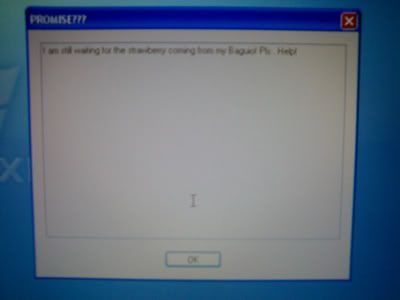
Eto lumalabas, bago mag startup ang windows.
_Bumabagal ang PC
-di modouble click and HD
-may file na makulit exiplorer.exe
-di sya mdetect ng some antivirus. PLS help,. TY

The Largest Car Forum in the Philippines
- Forums
- Discussions
- Events
- Community
Results 1 to 20 of 39
-
 Verified Tsikot Member

- Join Date
- Mar 2007
- Posts
- 224
April 22nd, 2007 01:24 PM #1
-
 Tsikoteer
- Join Date
- Jan 2006
- Posts
- 12,398
April 22nd, 2007 01:52 PM #2Sounds pretty new to me. If antivirus/antispyware software can't detect it yet.... you're out of luck. Got your Windows XP/Vista cd handy and attempt a reformat and reinstall?
-
Verified Tsikot Member
- Join Date
- Mar 2007
- Posts
- 224
April 22nd, 2007 01:54 PM #3hehehehe, dami ko ifoformat. 15 pc, waaahhh, wawa naman ako.\
panu yun kelangan ko rin kase yung mga file sa storage/ TY
-
Tsikoteer
- Join Date
- Jan 2006
- Posts
- 12,398
April 22nd, 2007 02:03 PM #4That's why I invested a lot in external storage, just in case for this sort of thing. Originally Posted by rudyphoto

I also don't network our computers at home. So, file-sharing and network detection is off. My kid's click happy. She'll click on anything. I don't want to take any chances.... If she catches something, it's limited to the computer she's using.
I'd say you have a bit over a full day's work. Good luck.
-
 Verified Tsikot Member
- Join Date
- Aug 2006
- Posts
- 223
April 22nd, 2007 02:08 PM #5anong gamit mong a/v suite? have you tried scanning with bitdefender? may free online scanner/malware remover sila http://www.bitdefender.com/scan8/ie.html. the catch is you have to run it on internet explorer. Originally Posted by rudyphoto
works great for the bad stuff na nakakalusot sa avg and norton.
-
Verified Tsikot Member
- Join Date
- Mar 2007
- Posts
- 224
April 22nd, 2007 02:10 PM #6Thank you sir for the info. Pati external storage meron , usb disk, memory cards and other pc/.
-
Verified Tsikot Member
- Join Date
- Aug 2006
- Posts
- 223
April 22nd, 2007 02:29 PM #7i really hope for your afternoon's sake that the bug your pc's have is just a slightly modified version of a well known malware signature. kung bagong malware yan at hindi madedetect ng bitdefender, mukhang kekelanganin mong magformat maghapon. another option pala is kaspersky. download the suite from the web, run the 30 day trial period and get the latest virus sig updates. Originally Posted by rudyphoto
and invest a bit in external storage that's to be used solely for backup purposes - yung hindi parating nakakabit sa mga pc mo. yung puwede mong itago sa baul at kalimutan tapos babalikan mo na lang pag nagkaproblema ng malala - katulad ngayon.
-
 Tsikot Member Rank 5
- Join Date
- May 2006
- Posts
- 8,357
-
Verified Tsikot Member
- Join Date
- Mar 2007
- Posts
- 224
April 22nd, 2007 03:20 PM #9yung 6 pc ko ganyan, tinanggal ko na nga network. Tinatry ko ngyun ang bitdefender at kaspersky. Originally Posted by Syuryuken
-
 Verified Tsikot Member
- Join Date
- May 2006
- Posts
- 65
May 3rd, 2007 12:42 PM #10try these: to protect your PC from all the vulnerability it will have once your on line, i recommend you have these programs:
choose between:
AVG Antivirus
Kaspersky Antivirus
Norton Antivirus
i recommend the AVG, its free, just keep it updated always
for spyware:
Windows Defender
Ad - Aware by Lavasoft
Spybot Search & Destroy
i recommend having at least two anti spyware programs for good protection. I personally use WIndows Defender and Ad - Aware. these don't consume a lot of memory space, and its really trusted.
and for your browser, go for mozilla firefox 2.0 ... its the safest ...
Good luck ... if symptoms persists, you might need a full formatting ...
-
 Tsikot Member
- Join Date
- May 2007
- Posts
- 3
May 6th, 2007 09:08 AM #11meron akong png alis jan sa exiplorer. exe..... kya nga lng nkalimutan ko kung saang site ko nkuha un. bgay u n lng me email address mo pra send ko sau. newbie lng ako pero ntanggal ko ung exiplorer gamit un.
-
Tsikot Member
- Join Date
- May 2007
- Posts
- 3
-
 Benzaholic
- Join Date
- Jul 2006
- Posts
- 3,600
May 6th, 2007 09:55 AM #13Isn't explorer.exe the hard drive mismo? If you click on any folder, it's the explorer program. I don't think it's that.
-
Tsikot Member
- Join Date
- May 2007
- Posts
- 3
-
Driver/PasaHERO
- Join Date
- Oct 2002
- Posts
- 1,310
May 6th, 2007 05:53 PM #15with that kind of message, parang may dinagdag lang sa mga start up ng PC nyo po. Try msconfig, disable nyo ung mga nde nyo kilalang programs na tumatakbo sa start up. Saw your thread also in TPC, their suggestions might also help

-
 Tsikot Member Rank 2
- Join Date
- Jul 2006
- Posts
- 1,103
May 7th, 2007 03:50 AM #16try to search here the avast antivirus http://soft-best.net/ meron po diyan
medyo malabo ang sreen shot niyo sir wala bang mas malinbaw?
-
 Verified Tsikot Member
- Join Date
- Apr 2007
- Posts
- 154
-
Tsikoteer
- Join Date
- Jan 2006
- Posts
- 12,398
May 8th, 2007 08:15 PM #18"PROMISE???
I am still waiting for the strawberry coming from my Baguio! Pls.. Help!"
That's the weirdest dialogue box I've seen thus far.
-
 Verified Tsikot Member
- Join Date
- Nov 2006
- Posts
- 240
May 8th, 2007 09:42 PM #19Try what Mhelskie suggested bro, it might help. From what I see, it could be a program that gets started along with other legitimate programs. And it is possible that multiple instances sya of the same virus/spyware which means it could have different filenames just incase one gets deleted.with that kind of message, parang may dinagdag lang sa mga start up ng PC nyo po. Try msconfig, disable nyo ung mga nde nyo kilalang programs na tumatakbo sa start up.
Go to Start- Run -type msconfig then ENTER. Go to "Startup " tab, you should see all programs that starts when windows starts. Then make a "Best/Looks familiar" guess which ones are goofy and which one are legit. Uncheck the goofy ones and press the OK button, windows will ask you to restart to take effect changes. btw, since u still have access to internet, you can google one by one the programs to check if their goofy. =)
-
 The Silent Threat
- Join Date
- Dec 2004
- Posts
- 1,310
May 8th, 2007 09:45 PM #20Well, it could be a "friendly" prank meant for a friend of some random IT student that spread far beyond its intended audience. It's not unheard of. Originally Posted by Jun aka Pekto
Kung hindi ma double click ang HD, try right-click->open. Might be an autorun script designed to keep the virus spreading.

 Reply With Quote
 Originally Posted by rudyphoto
