
this is mine

The Largest Car Forum in the Philippines
- Forums
- Discussions
- Events
- Community
Results 181 to 200 of 253
-

 Ignore

- Join Date
- Oct 2006
- Posts
- 5,994
-
 Tsikot Member Rank 9
- Join Date
- Feb 2008
- Posts
- 1,636
October 30th, 2008 09:14 PM #182im successful in downgrading my lappir from vista to xp.. here's my new look
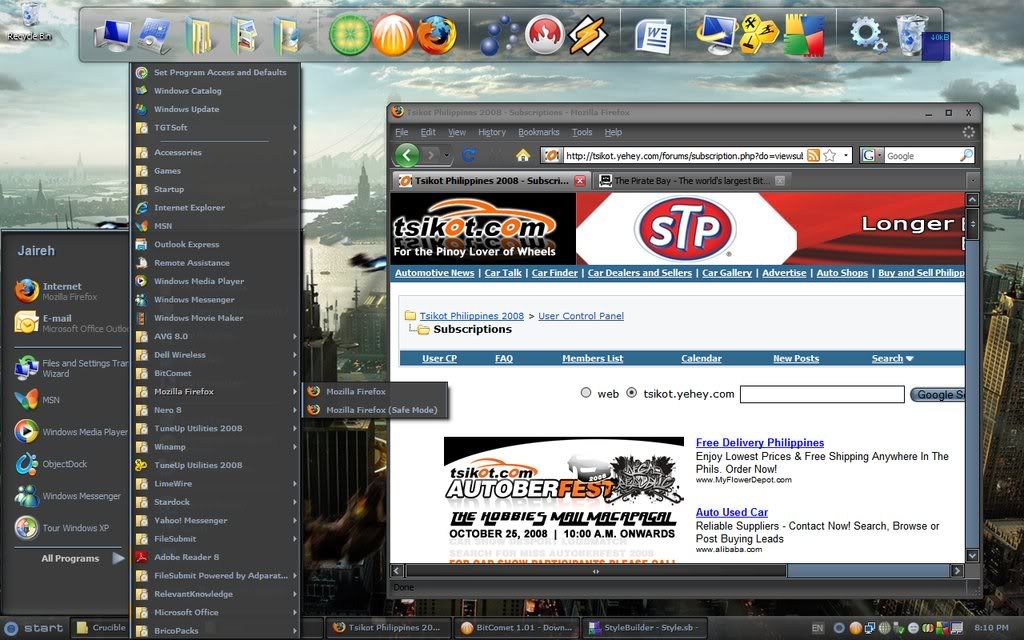
i installed brico packs to make the icons and system tray icons look like vista but i dodnt use the default brico pack theme. instead i downloaded another. enebaled transbar in brico packs and for some reason which i actually like, my submenus are semi transparent. pero when i uninstalled brico and installed transbar alone, i cant get the semi transparent submenus so i installed again. i also downloaded styleXP. loaded that theme in stylexp then applied transparent startmenu. nagiging transparent but after i restart nawawala ang transparency. also that theme contains a whole package of sounds and icons cursors and icons. but i still prefer the default icon package of brico packs. a while ago i was running object dock but found my system lagging every noe and then. so i used rocketdock and found it more stable on my xp system. i wonder why, but in my old vista system, object dock runs fine.
Last edited by JJCarEnthusiast; October 30th, 2008 at 09:23 PM.
-
 Tsikot Member Rank 4
- Join Date
- Jan 2006
- Posts
- 2,105
November 24th, 2008 01:25 PM #183Windows 7 Pre Beta 6801


people say this particular version is fast. even faster daw than xp. but it happens to be wrong in my P4 3.2ghz. my speedy vista v3 is even way more faster than this.
-
Ignore
- Join Date
- Oct 2006
- Posts
- 5,994
November 24th, 2008 03:42 PM #184microsupot is just profiteering as usual
Damn, son! Where'd you find this?

-
Ignore
- Join Date
- Oct 2006
- Posts
- 5,994
-
Tsikot Member Rank 4
- Join Date
- Jan 2006
- Posts
- 2,105
December 11th, 2008 11:58 PM #186my xp:

they say windows 7 drivers are compatible with XP. but the beta I tested, vista parin hanap.
-
 Tsikoteer
- Join Date
- Jan 2006
- Posts
- 12,398
-
Tsikoteer
- Join Date
- Jan 2006
- Posts
- 12,398
December 16th, 2008 07:08 PM #188My Toshiba laptop..... It originally had Vista Home Premium. I replaced it with XP Home earlier. Now, it's back to Vista Home Premium SP1:
1280 x 800
-
Tsikoteer
- Join Date
- Jan 2006
- Posts
- 12,398
December 17th, 2008 02:05 AM #189My Mac Mini desktop. It's still OSX 10.4.11 (Tiger). I see no pressing need to go Leopard just yet. Original desktop size 1440 x 900.
Add: The test pic I posted earlier was XP Home on the Toshiba laptop with an unknown uxtheme before I reinstalled the original Vista Home Premium.Last edited by Jun aka Pekto; December 17th, 2008 at 02:35 AM.
-
Tsikoteer
- Join Date
- Jan 2006
- Posts
- 12,398
December 17th, 2008 02:39 AM #190My main pc desktop. XP Home with WMP11 uxtheme. Like the Mac, I see no pressing need for this pc to go Vista. Original size 1440 x 900.
-
Tsikot Member Rank 4
- Join Date
- Jan 2006
- Posts
- 2,105
-
Ignore
- Join Date
- Oct 2006
- Posts
- 5,994
December 25th, 2008 06:28 PM #192ayus rin yung alpha ng windowsblinds, may kasama nang blur
Damn, son! Where'd you find this?
-
Tsikoteer
- Join Date
- Jan 2006
- Posts
- 12,398
-
Tsikoteer
- Join Date
- Jan 2006
- Posts
- 12,398
December 28th, 2008 12:14 PM #194My main pc with 720p 32" lcd tv as a monitor. Fonts set to 120 dpi which makes for great viewing from 5-6 ft away on the couch:
What doesn't show is the built-in Picture In Picture of the tv which allows watching cable tv while on the pc desktop.Last edited by Jun aka Pekto; December 28th, 2008 at 12:17 PM.
-
Tsikoteer
- Join Date
- Jan 2006
- Posts
- 12,398
December 28th, 2008 12:38 PM #195Surfing the internet with the Wii. The connection is a simple RCA analog A/V to the same 32" 720p lcd tv my main pc is hooked up to. I imagine if I used component rgb cables, the Wii res should be 720p as well (1280 x 768).
-
Ignore
- Join Date
- Oct 2006
- Posts
- 5,994
December 28th, 2008 12:51 PM #196coooool. ayus yang browser mo sir
 Damn, son! Where'd you find this?
-
Tsikoteer
- Join Date
- Jan 2006
- Posts
- 12,398
December 28th, 2008 11:13 PM #197The Wii browser is derived from Opera. Also, a usb keyboard works fine with the Wii. So, I don't have to use some funky game controller to enter text. Originally Posted by safeorigin

Among the consoles, I think the Wii has the best controller for internet use. It's about as easy to use as a stylus pointer plus it has convenient zoom in/out functions built in. That's why internet still looked good even though I'm using only analog connectors which limited res to 480p. I simply zoomed in to make text readable.
Although not all video-streaming sites work with the Wii, YouTube worked fine.
-
 Tsikot Member Rank 3
- Join Date
- Oct 2005
- Posts
- 780
December 29th, 2008 04:52 AM #198Jun, Originally Posted by Jun aka Pekto
I just bought my son Wii for Christmas. Didn't even realize na may wi-fi din like the PS3. As soon as I read your post here, I did a little search regarding Wii's web browser (Opera). Is it true that you have to pay 10 wii points (they say about $10) in order to use Opera Browser?
-
Tsikoteer
- Join Date
- Jan 2006
- Posts
- 12,398
December 29th, 2008 08:09 AM #199Nope. It's 500 points or $5. A 2000 point Nintendo card is around $20. It's also best to use the progressive scan/component rgb cable to give 720p res. Originally Posted by Camgen6
-
Tsikoteer
- Join Date
- Jan 2006
- Posts
- 12,398
December 29th, 2008 09:31 AM #200Oh. Connect a usb keyboard to enter text. Too bad a usb mouse isn't supported. But the Wii's controller is excellent as a pointing device. It's way better than gamepads. Originally Posted by Jun aka Pekto


 Reply With Quote


 Originally Posted by safeorigin
