
OTA din ako last update pero minor lang yon so nasa 200MB lang ata. 8 is a big oneOriginally Posted by cast_no_shadow



The Largest Car Forum in the Philippines
- Forums
- Discussions
- Events
- Community
Results 21 to 39 of 39
-

 3.14159265

- Join Date
- Aug 2004
- Posts
- 6,234
September 18th, 2014 03:38 PM #21
-
 Tsikoteer
- Join Date
- Jul 2006
- Posts
- 2,782
September 18th, 2014 04:07 PM #22nothing major change really for iphone 5. baka sa iphone 6/6+, may silbi ang ios8
-
Tsikoteer
- Join Date
- Jul 2006
- Posts
- 2,782
September 18th, 2014 04:31 PM #23sa mga hindi pa nag-a-upgrade, you may want to read this first:
https://www.yahoo.com/tech/read-thes...760524429.htmlRead These 6 Warnings Before You Update Your iPhone or iPad to iOS 8
Apple’s iOS 8, the latest version of the operating system for iPhone, iPad, and iPod, is now available. It’s pretty darn slick, and it’s what everyone who orders a new iPhone 6 will get when those devices start arriving on Friday. But the upgrade is also available for existing Apple devices. Should you upgrade right now?
If your answer is an instinctive, “Heck, yeah; I’m in!” then read our guide and get going.
-
3.14159265
- Join Date
- Aug 2004
- Posts
- 6,234
September 19th, 2014 10:36 AM #24Upgraded the iPad2 last night. Mas matagal pa download than the update itself. No problems so far. All games are working. Haven't explored the new features yet.
-
 Tsikot Member Rank 8
- Join Date
- Oct 2002
- Posts
- 21,433
September 20th, 2014 04:34 PM #25Almost bricked my iphone 5s while upgrading it to ios8. forgot to update my itunes to the latest version. Na-stuck yung screen ng iphone sa may itunes logo. tried several times to reset and plug & unplug from itunes, on-off ng PC, doing every kind of button pressing and holding sa phone, tsaka lang na-recognize ulit ng itunes yung phone.
Signature
-
 Darker and Bigger
- Join Date
- Oct 2002
- Posts
- 40,599
September 20th, 2014 06:44 PM #26Hinde na siguro ako mag upgrade to IOS 8 Sa IP5s ko, Sa IP6 na lang mag adjust. iPad na lang upgrade ko
Posted via Tsikot Mobile App
-
 Tsikoteer
- Join Date
- Sep 2010
- Posts
- 1,009
September 20th, 2014 09:13 PM #27If this happen again in the future, sir, download and install TinyUmbrella. It is a utility used also when you're iPhone is stuck in recovery mode. Originally Posted by boybi
Posted via Tsikot Mobile App
-
 Tsikoteer
- Join Date
- Dec 2009
- Posts
- 912
-
 Tsikoteer
- Join Date
- Jan 2014
- Posts
- 1,851
September 20th, 2014 10:43 PM #29Sir mas maganda ata upgrade direct sa unit. Pag sa pc using iTunes nagkaproblema talaga. Originally Posted by boybi
Ang concern ko sa iOS 8 di kaya bumagal iPhone o iPad? After installing.....
Posted via Tsikot Mobile App
-
Verified Tsikot Member
- Join Date
- Jan 2014
- Posts
- 655
September 20th, 2014 10:48 PM #30Ok itunes para wala ng clearing ng space. Ip5 sa akin. Feeling ko may topak yung banner notification. May times na habang open yung coc ko tapos may notification na banner at in-up mo, naghahang siya
-
Verified Tsikot Member
- Join Date
- Jul 2008
- Posts
- 32
September 20th, 2014 11:40 PM #31Before i upgrade my iPadMini, can you share your exprience on the new iOS8?
Posted via Tsikot Mobile App
-
 Tsikoteer
- Join Date
- Nov 2009
- Posts
- 12,364
September 21st, 2014 11:28 AM #32+1 is it worth updating? Ip5 user here.
Sent from my iPhone using Tapatalk
-
 Tsikoteer
- Join Date
- Jun 2012
- Posts
- 1,488
September 21st, 2014 11:39 AM #33^Ipad mini here, kaka upgrade lang kahapon. ok naman. parang parehas lang.
Posted via Tsikot Mobile App
-
Tsikoteer
- Join Date
- Jul 2006
- Posts
- 2,782
September 21st, 2014 01:29 PM #34lot's of minor features that you might want:
1. camera timer
2. new keyboard
3. audio message
4. family sharing of icloud accounts
5. health apps
battery performance is still the same. i got ip5 and ipad air
-
Tsikoteer
- Join Date
- Jul 2006
- Posts
- 2,782
September 26th, 2014 06:08 PM #35any brave souls out there who already upgraded their idevices to 8.0.2?
Apple Releases iOS 8.0.2 With Fix for Cellular Issues, Broken Touch ID
Apple has just released iOS 8.0.2, its second update to iOS 8 designed to fix major issues introduced with iOS 8.0.1, which went out to iPhone owners on Wednesday.
iOS 8.0.2 is available immediately as an over-the-air download and in addition to fixing the cellular issue introduced with iOS 8.0.1, it also includes the bug fixes that were included in the original iOS 8.0.1 update.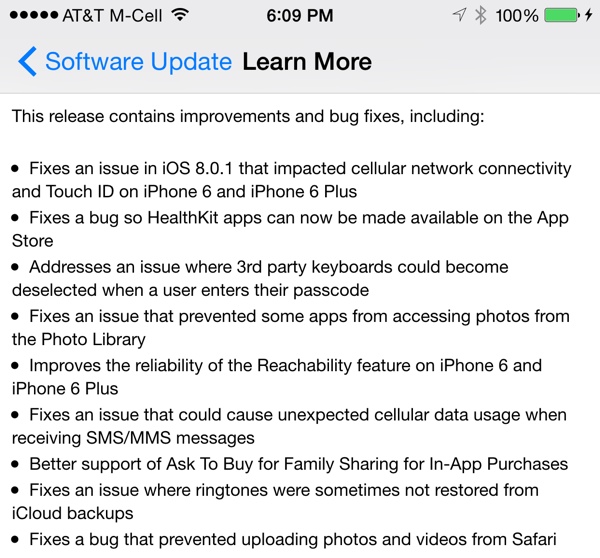
Apple Releases iOS 8.0.2 With Fix for Cellular Issues, Broken Touch ID - Mac Rumors
-
Tsikoteer
- Join Date
- Jan 2014
- Posts
- 1,851
September 26th, 2014 06:28 PM #36Medyo tagal mag download 3hrs downloading kya buti nag error kya di ko muna download
Posted via Tsikot Mobile App
-
Tsikoteer
- Join Date
- Jul 2006
- Posts
- 2,782
September 30th, 2014 07:42 AM #37sa mga naka ios8 na, take note
It appears that there may be a serious bug with the "Reset All Settings" option in iOS 8, causing users who activate the feature to lose all of their iWork documents stored in iCloud Drive. According to multiple posters on the MacRumors forums, using the "Reset All Settings" option under General --> Reset has caused documents to be permanently deleted from iCloud Drive.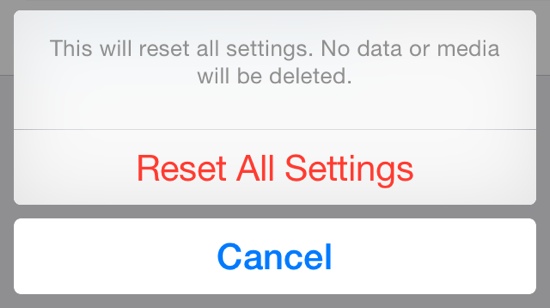
Bug in iOS 8's 'Reset All Settings' Option Also Erases iCloud Drive Documents - Mac RumorsUsers who have iCloud Drive enabled may want to refrain from using the "Reset All Settings" option on their devices for the time being, in order to avoid accidentally erasing important documents stored in iCloud Drive.
-
Verified Tsikot Member
- Join Date
- Aug 2014
- Posts
- 16
October 3rd, 2014 06:37 AM #38ZENMasterTYL: I'm downloading 8.0.2 right now. Sobrang bagal ng download.
-
Tsikoteer
- Join Date
- Jul 2006
- Posts
- 2,782
October 21st, 2014 08:31 AM #39ios 8.1 is out
Apple Releases iOS 8.1 With Apple Pay Support, SMS Relay, Camera Roll, and More - Mac RumorsApple Pay support for iPhone 6 and iPhone 6 Plus (U.S. only)
Photos include new features, improvements, and fixes
-Adds iCloud Photo Library as a beta service
- Adds Camera Roll album in Photos app and My Photo Stream album when iCloud Photo Library is not enabled
- Provides alerts when running low on space before capturing Time Lapse videos
Messages includes new features, improvements and fixes
- Adds the ability for iPhone users to send and receive SMS and MMS text messages on from their iPad and Mac
- Resolves an issue where search would sometimes not display results
- Fixes a bug that caused read messages not to be marked as read
- Fixes issues with group messaging
Resolves issues with Wi-Fi performance that could occur when connected to some base stations
Fixes an issue that could prevent connections to Bluetooth hands-free devices
Fixes bugs that could cause screen rotation to stop working
Fixes an issue in Safari where videos would sometimes not play
Adds an option to select between 2G, 3G, or LTE networks for cellular data
Fixes an issue in Safari where videos would sometimes not play
Adds AirDrop support for Passbook passes
Adds an option to enable Dictation in Settings for Keyboards, Separate from Siri
Enables HealthKit apps to access data in the background
Accessibility improvements and fixes
- Fixes an issue that prevented Guided Access from working properly
- Fixes a bug where VoiceOver would not work with 3rd party keyboards
- Improves stability and audio quality when using MFi Hearing Aids with iPhone 6 and 6 Plus
- Fixes an issue with VoiceOver where tone dialing would get stuck on tone until dialing another number
- Improves reliability when using handwriting, Bluetooth keyboards, and Braille displays with VoiceOver
Fixes an issue that was preventing the use of OS X Caching Server for iOS updates
 Originally Posted by cast_no_shadow

 Reply With Quote
