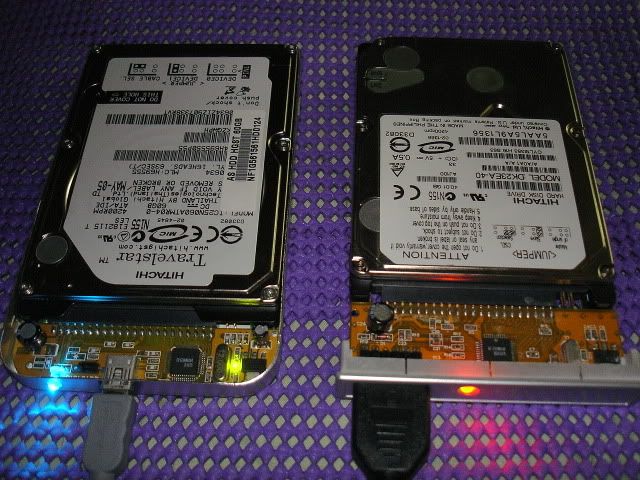
you just have to buy a USB 2.5" hard disk casing (around P350 - P600) then install any 2.5" HD and you have yourself a USB external HD.Originally Posted by maykel


The Largest Car Forum in the Philippines
- Forums
- Discussions
- Events
- Community
Results 41 to 50 of 50
-

 Verified Tsikot Member

- Join Date
- Dec 2004
- Posts
- 228
October 10th, 2005 04:38 PM #41
-
 Growers Less Grease
- Join Date
- Oct 2002
- Posts
- 509
October 10th, 2005 07:17 PM #42Hey, Thanks for the info...ive got another question: im going to buy an HP laptop & ive narrowed my choice between the 2.0Ghz & 1.8Ghz models. Malaki ba ang difference ng speeds ng 1.8 & 2.0Ghz? Malaki kasi ang difference sa price nung 2 models e. Originally Posted by radiazone
-
 Одна из черт возьми
- Join Date
- Oct 2002
- Posts
- 15,528
October 10th, 2005 07:23 PM #43 Originally Posted by nitrox
nope. hindi noticable yan. imho, bawiin mo na lang sa RAM.
-
 sikat na dentista
- Join Date
- Nov 2002
- Posts
- 3,153
-
Verified Tsikot Member
- Join Date
- Oct 2004
- Posts
- 132
October 10th, 2005 07:31 PM #45Yeah. Upgrade in these order RAM, video card, processor. You can also do research work using www.tomshardware.com
Good luck.
-
 HONDA VTECleta
- Join Date
- Jan 2005
- Posts
- 625
October 10th, 2005 10:11 PM #46whats the purpose of the laptop, are you a gamer, or just browser, do some presentations to the clients..... Originally Posted by nitrox
1.8 is good enough, just buy additional RAM, mine is at 1.73GHz but i can play 3D games, Prince Of Persia, DOOM3, Battlefield and other exciting 3d games....
-
 Verified Tsikot Member
- Join Date
- Jul 2005
- Posts
- 265
-
Verified Tsikot Member
- Join Date
- Jul 2005
- Posts
- 265
-
Verified Tsikot Member
- Join Date
- Dec 2002
- Posts
- 47
October 11th, 2005 09:38 AM #49 Originally Posted by cvc6
Correct ka riyan! Malakas sa kuryente desktops (300 W power supply, monitor 90 W). Kumpara mo sa note book 90W lang.
-
Growers Less Grease
- Join Date
- Oct 2002
- Posts
- 509
October 11th, 2005 10:25 AM #50nah, i dont do much games on the PC, i use my PS2 instead. i'll use the laptop for browsing, presentations, photo editing. thanks for the suggestion, bawiin ko na nga lang siguro sa RAM. mas mura bumili ng extra RAM than get the laptop with a 2.0Ghz speed. Originally Posted by radiazone
 Originally Posted by maykel


 Reply With Quote