


Mine was bought 2010, hard disk napalitan na pati keyboard. Pero ok pa rin, ginagamit ko pa rin sa office.Originally Posted by NiCe2KnowU


The Largest Car Forum in the Philippines
- Forums
- Discussions
- Events
- Community
Results 21 to 40 of 136
Hybrid View
-

 Moderator

- Join Date
- Nov 2010
- Posts
- 25,276
September 24th, 2018 11:45 AM #1
-
Tsikoteer
- Join Date
- Aug 2003
- Posts
- 9,720
September 24th, 2018 01:31 PM #2 Originally Posted by Ry_Tower
Acer has been off my radar for the longest time, after i saw my cousin's unit suffer major problems, all within the warranty period.
Am thinking about getting a small 11-incher to lug around. Nakaka ilang dalhin yung ultrabook ko to not-so-safe areas. i find that a 13-incher is still to bulky to lug around casually.
-
 Fix Or Repair Daily
- Join Date
- Sep 2013
- Posts
- 1,832
September 24th, 2018 04:06 PM #3Wow 8 yr old laptop, maalaga ka sa gamit lodi. Sirain nga hard disk drive ng acer, yung keyboard iwasan mo puntahan ng langgam, nilangam keyboard ng acer ko buti naagapan ko Originally Posted by Ry_Tower
Sent from my iPhone using Tapatalk
-
 High & Dry
- Join Date
- Jul 2007
- Posts
- 57,767
-
 Verified Tsikot Member
- Join Date
- Nov 2014
- Posts
- 922
September 24th, 2018 10:18 AM #5Currently using an HP laptop from 2013. After a few weeks may bubbles agad ang screen. Good thing under warranty pa siya kaya nireplace ang screen. 3 months ago naman the webcam stopped working and now the touchscreen doesn't work (not that I use both features) and it has a small bubble at the bottom side of the screen. Other than that it still works but I'm getting an Asus or Lenovo early next year.
-
Verified Tsikot Member
- Join Date
- Oct 2017
- Posts
- 1,186
September 24th, 2018 11:23 AM #6Been using an HP ProBook Core i5 since 2014 and it's been cracking on. Wala naman lag or blue screen of death experienced. Truthfully, I like the Thinkpad Core i5 more since I've used one with my previous work for more than 5 years. Mahal nga lang. I think it was around Php 80k bnew before and it could be more than that now.
That said, this model could be a winner given Cathy's requirements and price point:
Lenovo IdeaPad S41p 5939-1169 (Black) 14-inch Multi-Touch 4th Gen Core i5-42U, NVIDIA GT72M 2GB w/ Win8 | VillMan Computers
-
Tsikoteer
- Join Date
- Jul 2009
- Posts
- 3,604
September 24th, 2018 11:29 AM #7Ok sana but wouldn't pay so much for an old model... Originally Posted by KingoftheNorth
-
Tsikoteer
- Join Date
- May 2006
- Posts
- 1,668
October 13th, 2018 09:47 PM #8ASUS VivoBook S15 S51UN | Laptops | ASUS Philippines
Check that out. Core i5 processor will fit your budget. If you have a bit more budget, have it fitted out with 250+gb m.2 ssd.
Sent from my ONEPLUS A5000 using Tapatalk
-
 Tsikot Member Rank 2
- Join Date
- Mar 2004
- Posts
- 10,314
-
Verified Tsikot Member
- Join Date
- Feb 2014
- Posts
- 2,778
-
High & Dry
- Join Date
- Jul 2007
- Posts
- 57,767
February 6th, 2019 03:25 PM #11Any new recommendations?
My laptop is being held together by duct tape and the hinges are broken so it's leaning against a box. The DVD rom stopped working years ago and last night the HDMI stopped working too. My Mom asked me several times already when I plan to buy a new laptop
I don't want to go above P30k, as I am quite happy with my Lenovo. It lasted 6 years and it cost me about the same amount (compared to my Toshiba that was P80k in 2005!)
The guys who recommended the G470 aren't active anymore, they really made an excellent recommendation
-
High & Dry
- Join Date
- Jul 2007
- Posts
- 57,767
-
High & Dry
- Join Date
- Jul 2007
- Posts
- 57,767
-
Tsikoteer
- Join Date
- Nov 2009
- Posts
- 3,522
February 6th, 2019 05:07 PM #14^ Hindi na uso, may batas na rin against blank CD kaya bihira kana makakita.
Kahit CDRKing magsasara na yata kasi wala na sila benta, dapat USBKing ang itawag sa kanila.
Good buy na yan, karamihan ng biz laptap ngayon SSD na rin, at least yan 1TB HDD dami mo DL space.
-
 Tsikoteer
- Join Date
- Apr 2010
- Posts
- 2,135
February 7th, 2019 02:40 PM #15^ speaking of CD/DVD-ROM, wala na bang nagbebenta ng External DVD-ROM?
Sent from my ASUS_Z011D using Tapatalk
-
Tsikoteer
- Join Date
- Nov 2009
- Posts
- 3,522
February 7th, 2019 10:29 PM #16^ Meron parin Asus SDRW-8D2S-U LITE Portable External DVD Drive | VillMan Computers
Usually free yan ska mouse kung bibili ka laptop
Ang tinatangal na nila yung VGA, Com port, USB to type-C. Yan pa naman impt.
-
 Tsikoteer
- Join Date
- Jan 2006
- Posts
- 12,398
May 31st, 2019 02:08 PM #17Anyway, I think a suitable replacement for the Lenovo G470 would be another 14" Lenovo? I mean, it makes sense to me.

I wouldn't recommend a slim form-factor ASUS. They're plastic and they wiggle like crazy.
However, my (non-slim) old ASUS RoG G46VW is built like a tank. The outer lid has a rubberized texture. It's got dedicated (silent) fans and vents for both the i5-3230m CPU and GTX 660m GPU. Being a 14" laptop, there are no wiggles whatsoever. The lid opens and and closes so stiff, it feels brand new. I used an external keyboard n mouse. So, the keyboard and trackpad are pristine. Hardly any scratch or dent.
If the Lenovo G470 exterior is still in good shape, I would upgrade it to an SSD, 8GB RAM, and new battery.
But, if the keys are all worn out, the laptop has an overall beat-up look, and some ports/devices are getting flaky behavior, then it's time to buy a new one.Last edited by Jun aka Pekto; May 31st, 2019 at 02:19 PM.
-
High & Dry
- Join Date
- Jul 2007
- Posts
- 57,767
May 31st, 2019 02:14 PM #18I'm thinking this. Excellent reviews and similar to the specs that Jut recommended for the cheaper laptops. It's the best seller in Amazon so it must be good [emoji14] Originally Posted by Jun aka Pekto

Oh, it's a hard disk/storage pala. Thanks for the explanation. Originally Posted by _Qwerty_
Sent from my SM-N960F using Tapatalk
-
 Dalek
Dalek
- Join Date
- Dec 2006
- Posts
- 17,314
May 31st, 2019 03:25 PM #19If you'll get this, change the storage fron 1TB hard drive to 256GB SSD. Should be an $80 upgrade. Originally Posted by _Cathy_
Or just find another model that already comes with a 256GB SSD off the rack.
Sent from my SM-G950F using Tapatalk
-
Dalek
- Join Date
- Dec 2006
- Posts
- 17,314
February 9th, 2019 09:23 PM #20Suggest you get a laptop with these specs as minimum:
Core i5-8250U (this is quad-core vs the dual-core i5-7xxx series, more future-proof)
8GB RAM (16GB recommended, again for future-proofing)
256 GB SSD (512GB recommended so you can fit a lot of files without needing an external hard drive).
A laptop with these specs will set you back over 40k but it's worth it. Big jump in responsiveness vs the sub-30k laptops which usually only have 4GB RAM, an Intel Pentium CPU (much slower than i5), and non-SSD storage.
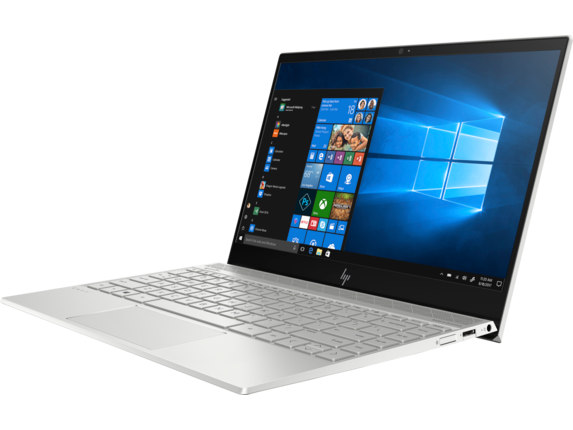
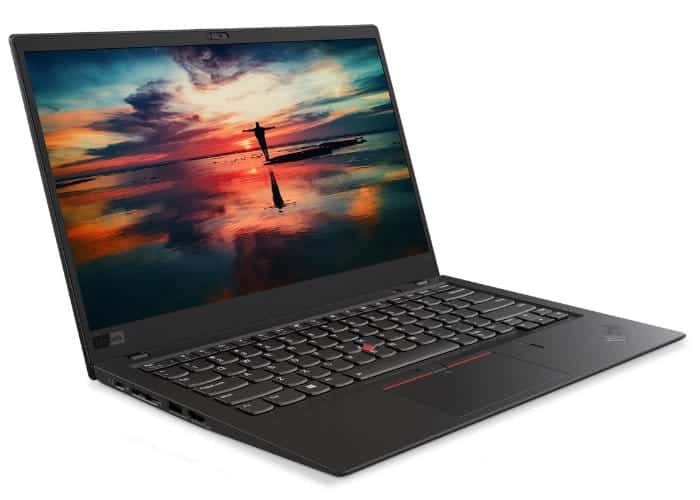
I would suggest either the HP Envy 13 or the Dell XPS 13. If budget allows, also consider a Lenovo Thinkpad X1 Carbon - it's frequently touted as the best business laptop available in the market today.

Sent from my SM-G950F using TapatalkLast edited by jut703; March 2nd, 2019 at 10:05 PM.
 Originally Posted by NiCe2KnowU

 Reply With Quote

