Build my own lcd projector
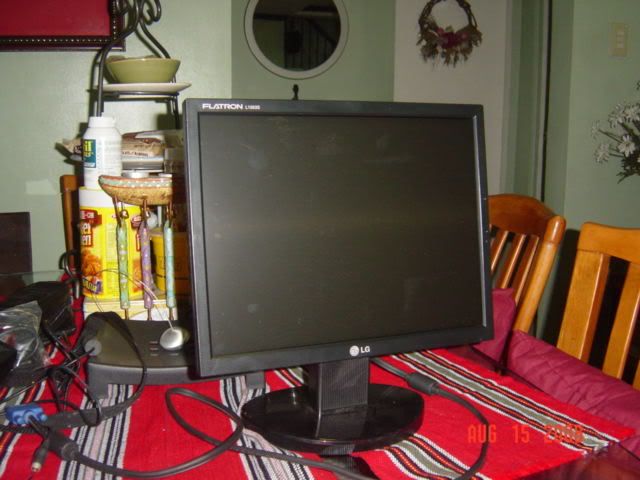
Bought used LG 1553s lcd monitor for 4500 pesos
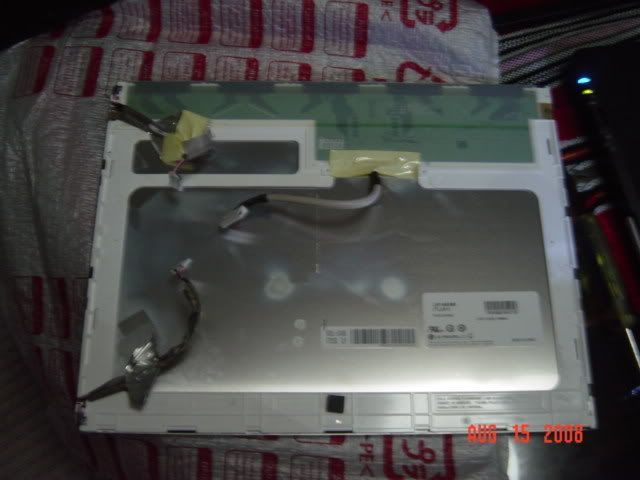
strippled the monitor
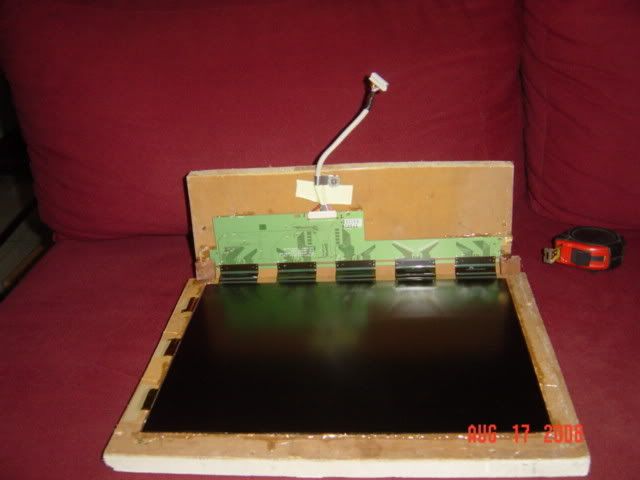
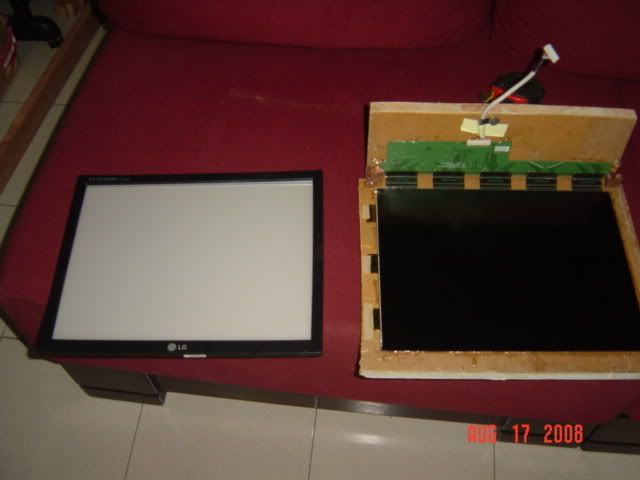
Put the lcd pnael in the frame
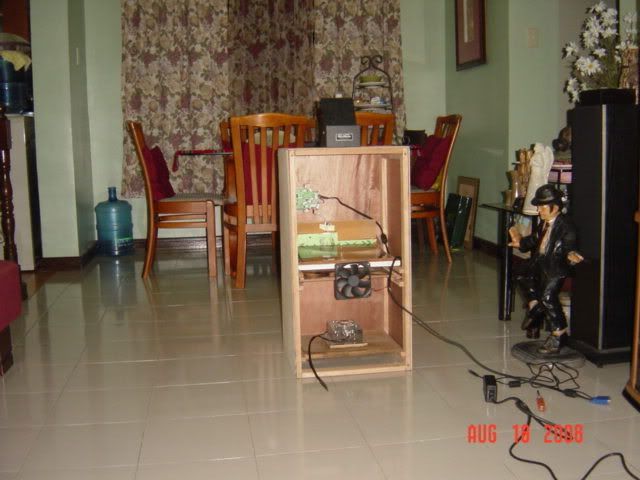
Made a box and put overhead projector lenses in the box including the 25ow metal halide bulb. Bulb has 10,000 hours life
![]()
Build my own lcd projector
Bought used LG 1553s lcd monitor for 4500 pesos
strippled the monitor
Put the lcd pnael in the frame
Made a box and put overhead projector lenses in the box including the 25ow metal halide bulb. Bulb has 10,000 hours life

![]()
My result in 90 inches diagonal screen.
http://i224.photobucket.com/albums/d...r/DSC05812.jpg
http://i224.photobucket.com/albums/d...r/DSC05813.jpg
http://i224.photobucket.com/albums/d...r/DSC05799.jpg
My desktop
http://i224.photobucket.com/albums/d...DSC06049-1.jpg
http://i224.photobucket.com/albums/d...DSC06096-1.jpg
If you want to build, i can share my work.
This is a very rewarding project. though the box is big. The result is very satisfying.
Just post your question here if you need help.
Been doing this as a hobby for the last 5 years.
http://i224.photobucket.com/albums/d...DSC06138-2.jpg
http://i224.photobucket.com/albums/d...DSC06139-2.jpg
http://i224.photobucket.com/albums/d...r/DSC06156.jpg
Last edited by ghosthunter; October 6th, 2008 at 02:55 PM.
Kinda bulky but nice project.
I went for the lazy route. I just bought an Acer DLP projector and connected that to my media PC. It came with a free 80in x 80in projector screen.
i used to own infocus x1. its nice but notice l;ight output going down in less than 1000hours. Sold it. bulb is 17t pesos. I always woory too much that bulb is gonna eplode anytime. Cannot watch more than 2 hours w/o worrying.
Build myself a projector, bulb is 3500 pesos,10,000 hrs advertise life. Now i can watch 4-6 hours anytime w/o worrying for the bulb. Can now use for karaoke during family gatherings and no worry anymore for the bulb say 8 hours continuously. The bulb is designed to work 24 hours a day.
http://i224.photobucket.com/albums/d...r/DSC06264.jpg
http://i224.photobucket.com/albums/d...r/DSC06255.jpg
http://i224.photobucket.com/albums/d...r/DSC06259.jpg
Last edited by russpogi; October 7th, 2008 at 04:38 AM. Reason: changed IMG BBCodes to Links
does that only apply to pc as the source? or does it also work for dvd players?
depends on the monitor's original inputs. If the DVD player has a VGA output, you can use that too.
If the monitor only has VGA input, you can use a TV/RCA/S-Video to VGA signal converter. I used one of those to use a surplus computer monitor as a security camera display (replacing the expensive to replace worn out CRT security camera display).
good evening Im a new member I'm very interested with your lcd projector> First of all You really done a good job their. gusto ko sana makita yang lcd projector mo talagang gagawa ako or baka magpagawa ako sayo.
Yes you can see it. i live near SM San Lazaro and UST. But I cannot build for you as this is a diy project.
Here is the summary for building a projector.
Step by Step guide in buidling your own cheap lcd projector-For movies,gaming,karaoke and outdoor use
Materials Needed.
A> Lenses
1. Projection lens- Magnifies the image of the lcd
2. Fresnel lens
a. Field fresnel - Converged the lighted image of the lcd to the projection lens
b. Collimator fresnel- Focuses on the lamp. Collects the light from the lamp and transmit parallel light rays to the lcd.
3.Front surface mirror-optional
4. 12v dc power supply for fans and lcd-use pc power supply
B>Light Engine
1. Metal halide bulb- 150w -250w: high lumens/ color temperature bulb
2. Ballast- Controls the power delivered to the lamp
3. Capacitor- Power factor corrector. power saver
4. Ignitor- Start up the lamp creating 3.4kv sparks to fire the chemical inside the lamp
5. Reflector- Recovers wasted light from the lamp
6. Condenser lens - Increase light collecting efficiency and divert more light to collimator fresnel
7. IR/UV filter- reduce temperature of lcd created by heat /infrared radiation generated by the lamp. Reduce UV rays to prevent discoloration of lcd.
Others
1. Front surface mirror- bend the light to make the box smaller
2. 2-units blower fans - cool down all the parts inside the projector
3. Fan grill- use for mounting parts of the light engine
4. bolts and nuts of diff sizes
Step 1- Choosing your lcd.
Consideration choosing the right LCD for your need.
A> LCD size
DIY projector normally is bigger , or alot of times, alot bigger than commercial projector. Size normally is the first issue.
1. If size is not an issue, then there are alot of cheap used LCD out there with digonal size of 15 inches with xga resolution, very good enough to project high definition images.
2. If size is a problem, then its gonna take alot of effort to get compatible LCD. But if you have the money to spend, you can easily buy on line. Smaller LCD like 8.4 inch diagonal normally has SVGA resolution, few are xga resolution which are very expensive say around $250 on line.
B> LCD resolution
1. XGA Resolution (1024x768 pixel) A bigger LCD say 15 inches and above has xga resoluiton which are capable enough to display high definition images. Smaller LCD with XGA resolution are expensive.
2. SVGA resolution (800x600 pixels) - DVD disk has a resolution of 720x480 pixels so if you have an lcd with svga resolution, it can display the full resolution of dvd players which can display very good images (xga of course is alot better)
3. VGA resolution (640x480) - If you are really low on budget, some small lcd has vga resolution. this can still project good images though your projected image size will be limited otherwise you will see screendoor effect(pixelated) and washout images.
It is not recommended anymore to use lcd with resolution lower than vga resolution.
C> LCD inputs
1. VGA input - Never buy the lcd without vga input (computer video cable) . VGA input can display progressive output from your sources like pc and component output ( need transcoder to convert to vga) of dvd player .
2. HDMI/DVI (digital input) - Some lcd models have DVI input which is very good because some dvd players have dvi output. Very few lcd have HDMI input. DVI/HDMI peforms better than vga interface because it will bypass the A/D converter from dvd players, pc, and lcd monitor. The lesser electronics used, the better is the image quality.
Composite input/ s-video of dvd players only displays 720x240 pixels so avoid using this as much as possible. Remember VGA interface is the minimum requirements.
D> LCD aspect ratio
1. 4:3 aspect ratio- It has the same aspect ratio of regular TV. In the old days, most of the movies are 4:3 so no problem in displaying the correct image size. But nowadays, most movies are widescreen (1.77:1)or letterbox format ( 2.35:1). So you will see black bars in top and bottom of your image. You will lose up to 60% of lcd resolution when you use widescreen and letterbox movies so image quality will go down.
2. 16:9 aspect ratio- When you play 4:3 aspect ratio movie, you will see black bars at the two sides. But nowadays, widescreen are prevalent and you will use full resolution of your lcd and image quality will be better than when using 4:3 aspect ratio lcd.
E> Contrast Ratio - This is other lcd specification that can make lcd cheap or expensive ( the other one is resolution). Higher contrast say more than 1000 can produce beautiful images than with lcd with lower resoltuion. Contrast is the difference in intensity of white and black.
F> Response time- Lower lcd response time means lcd can display moving images smoothly. try to get lcd with response time not higher than 25ms . The lower, the better
G> Number of colors- Look for lcd with 16.7million colors to give accurate color rendition. colors with 200k is also good but will not be displaying the real color.
E> Compatibility- After learning all of the above, you must be sure that lcd is compatible. Compatibkle lcd has only one circuit board attached to the lcd panel.
Step 2- LCd strippinng and mounting the lcd in the panel
Strippping of lcd differs from on another. Each lcd is unique in construction. Others are very easy to strip and others will give you hard time. To be sure, just follow the lead of other builders.
Mounting the lcd in the frame: Before stripping the lcd monitor, make sure the frame is ready. You need to know the effective display area of the lcd so that you can make the frame. Use 1/4 to 1/2 marine or ordinary plywood for the frame. Aluminum and steel plate is also very good.
"Mounting of the lcd in the frame is the most critical part of the project". Make sure that the lcd is fully secured and hanging wires should be clamp to the back board. Lcd is the most expensive part of the project so dont take a shortcut. This is a very strong warning to all builders. The flat ( orange cable) ribbon cable connecting the lcd to the A/D board is very fragile. If you break this, then your lcd is dead. totally.
Be accurate in making the frame. The frame open area should be about 0.5mm bigger than the lcd effective display area in all sides. Again be accurate or you will regret this later.
In the pics, you will see the finished frame and the lcd with still the backlight. No need for the backlighht in this project. You will need to remove the backlight and just make this as something useful say desktop lighting.
In the pics, you will see the lcd in the frame and the controller board installed in the backboard of the frame. The backboard is so much bigger so in your project just make this big enough to fit the controller baord.
Step 3: Building the Light engine
Additional Materials needed:
Base plate: 1 pc
Fan Grills: size of the ordianry case fan
Assorted bolts and nuts.
4 springs
see pics.
a> mount the 4 -6inches long bolt in the base plate. The position of the bolt coincide with holes of the fan grills.
b> mount the reflector and put the fan grill on top. the fan grill was cut to accomodate the reflectro opening
c>put a spring on top of the 4 nuts to allow expansion of the reflector when heated
d>mount bulb base in the fan grill
e> add another fan grill to accomodate the opening of the condenser lens
f> mount the condenser lens
g> mount another fan grill to hold the condenser lens
h> put the housing or cover
e> install the IR/UV filter
All the light engine parts must be placed very close to each other except the IR/UV filter which is one inch from condenser lens.
Step 4 Buiding your box
The box size depends on your design. The focal length of projection lens and collimator fresenel dictates the length of the box. the width of the box is dictated by the width of your lcd panel
Sample design:\
projection lens focal length: 345mm
Collimator fresnel: 220m
allowance
collimator fresnel to lcd: 2 inches for air circulation
Bulb to base plate: 2 inches
Most likely length of the box: 14in(345mm)+8.7(220mm)+2+2
;approx 27 inches
This is for the straight thru design. No mirror is used and the projector is in horizontal position. To save spave. a mirror is added on top and the projector will be in vertical position. This saves space.
Pictures of completed projector and all parts mounted. A power supply for fans and lcd using pc power supply is intalled near the projection lens.
Fans are installed at the sides one blowing between lcd and collimator fresenl and the other sucking out the hot air inside the box located down below.
Image quality of this projector is very nice
10.2 inch lcd widescreen
800x480 resolution
response time: 25 ms
colors:262K
Sample image
links:http://www.diyaudio.com/forums/showt...5&pagenumber=1
http://s6.invisionfree.com/diyprojectorphils/
www.lumenlab.com
www.allinbox.com
*hertzblaster1 - sir, ako, malapit na,,, malapit na akong makahanap ng electrician... will just text you soon.... thanks![]()
Sir hertzblaster,
saan po sa manila makakabili ng mga parts para sa project na ito?
thaks!