


Been using a dedicated GPS on my HU ,still using map droid and map factor on my droid phoneOriginally Posted by Calistro


The Largest Car Forum in the Philippines
- Forums
- Discussions
- Events
- Community
Results 1 to 20 of 259
Hybrid View
-
 Tsikoteer

- Join Date
- Apr 2013
- Posts
- 1,365
July 23rd, 2013 12:08 PM #1
-
Verified Tsikot Member
- Join Date
- Jun 2013
- Posts
- 159
October 22nd, 2013 04:23 PM #2Anybody here na nakagamit na ng kanilang tablet apps as a gps? I'm condsidering kasi un Nexus 7 2nd gen for its 7inch screen as a gps....I have namn internet connection sa car using huawei....
-
 COO - Child of Owner
- Join Date
- Sep 2005
- Posts
- 15,310
October 22nd, 2013 05:36 PM #3yes download ka lang app.. or google map.. basta may internet you can use it as GPS..
Originally Posted by Kevz321
-
 Tsikoteer
- Join Date
- Dec 2009
- Posts
- 3,006
October 27th, 2013 08:24 PM #4open maps for android transforms your smartfon a dedicated gps device, even with no internet connection available you can find your way to your destination & back home
Last edited by kisshmet; October 27th, 2013 at 08:27 PM.
-
 BANNED BANNED BANNED
- Join Date
- Nov 2005
- Posts
- 2,372
October 29th, 2013 06:49 AM #5Ako sir, waze gamit ko pero meron ung standalone. Dami diyan hanap ka lang sa android market may mga trial din. Originally Posted by Kevz321
Mas oks pagkasama ko si esmi kasi ung phone niya foldable ung case kaya pagnilagay ko sa dash ung s4 nakahorizontal for better viewing angle habang nagdadrive ka.
Mas ok din kung nakadata ka kasi kadalasan pagwaze gamit ko iniiwas ako sa traffic. Un nga lang wag mo asahan sa makati, wasak waze sa makati sir.
Sent from my GT-I9300 using Tsikot Car Forums mobile app
-
 Night stalker
- Join Date
- Jul 2009
- Posts
- 10,310
October 29th, 2013 07:54 PM #6most of the time i use waze and google navigation, for waze kung mag search ka for location use the foursquare option kasi mas extensive yun sa mga establishment. minsan google navigation ginagamit ko kasi extensive din ang search capability ng google. Originally Posted by Kevz321
-
Tsikoteer
- Join Date
- Jul 2013
- Posts
- 2,450
October 29th, 2013 08:48 PM #7better use an offline map. and make sure you have power source for your tab. mabilis makaubos ng batterya ang GPS. Originally Posted by Kevz321
I use my iPhone with papago map. very satisfied naman ako. meron din ako waze pero hindi ko pa nagagamit. accidentally bought papago so I use it all the time.
-
 Tsikoteer
- Join Date
- Jul 2006
- Posts
- 2,782
October 30th, 2013 08:03 AM #8i'm glad i didn't bought a gps when we went to ilocos. google maps+waze really did the job
-
Verified Tsikot Member
- Join Date
- Jul 2007
- Posts
- 13
November 4th, 2013 01:46 PM #9 Originally Posted by Kevz321
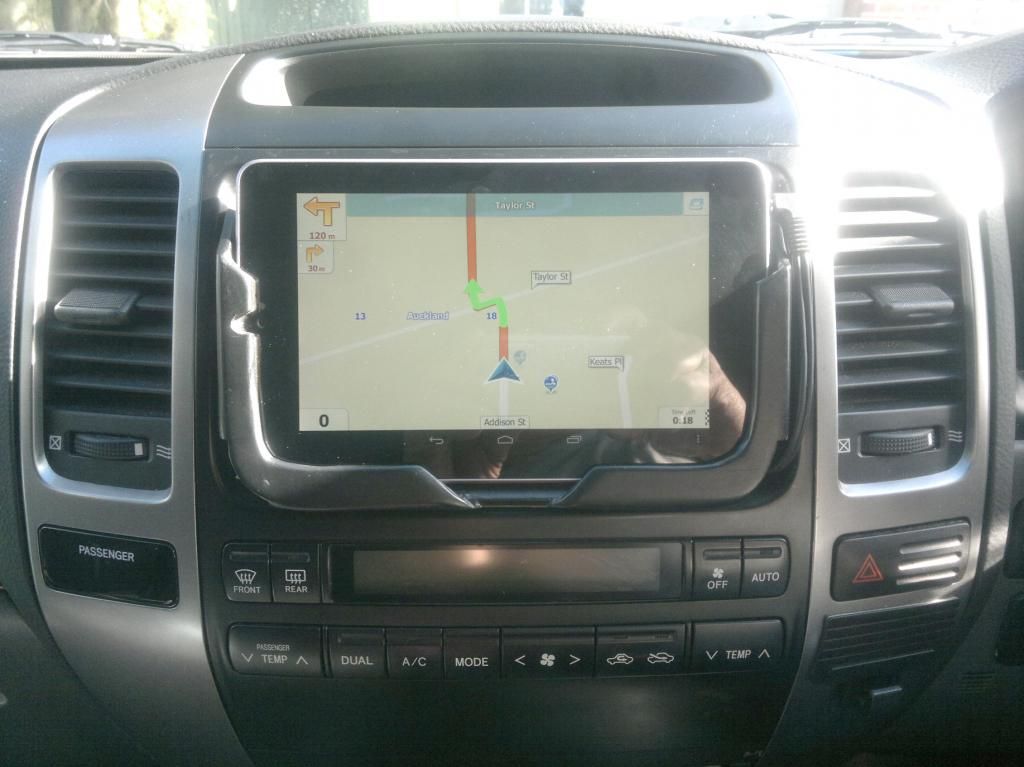
Ginagamit ko ang aking Nexus 7 kung hindi ako pamilyar sa lugar na pupuntahan. Tatlo ang nakainstall kong Gps: Tomtom,Sygic at IGO Primo.
-
Tsikoteer
- Join Date
- Jul 2011
- Posts
- 1,711
November 4th, 2013 04:06 PM #10Ganda ng tablet holder mo Sir saan mo yan nabili? And how much? Originally Posted by inekem
Sent from {device_name} for [os_platform] using Tsikot Forums Mobile App
-
Verified Tsikot Member
- Join Date
- Apr 2013
- Posts
- 273
November 5th, 2013 03:16 PM #11 Originally Posted by inekem
oo nga. san nakakabili ng ganyan? Originally Posted by Manilablock
BTT: OK naman ang Google Maps. Actually pwede mo sya gamitin kahit hindi always ON ang data mo. Ako ginagawa ko search lang ng ruta, then pag nakapili na ng route, pwede na patayin yung data. OK na kahit GPS na lang naka-ON, gagana pa din kahit yung turn-by-turn voice guidance. Yun nga lang once na umiba ka ng daan, hindi sya mag-re-reroute, need mo i-ON ulit yung data para mag-reroute sya.
-
 Utility Diesel
- Join Date
- Apr 2007
- Posts
- 699
November 5th, 2013 08:46 PM #12I am wondering bakit di sikat sa thread na to ang Nokia / Here Maps on Nokia SmartPhones for GPS Navigation.
Dahil ba sa hindi Android/iOS and OS ng Nokia
True Offline Turn by Turn Voice Navigation without the need for 3G Connection ang GPS sa Nokia SmartPhones.
Tested ko na to. Locally and Internationally.
Try niyo guys and you would not regret it although pahirapan ng makakita ng Symbian na Nokia. Karamihan Lumia (Windows Phoen na)
Nonetheless, those Lumias still have Offline GPS.
And Nokia supplies GPS to major car manufacturers.
Note that the Nokia bought by Microsoft is the cellphone business only and not the Network and Technology Division.Last edited by nels76; November 5th, 2013 at 08:49 PM.
-
 Boobs Make Me Happy
- Join Date
- Aug 2010
- Posts
- 3,527
November 5th, 2013 09:19 PM #13It isn't popular since trying to look for Nokia nowadays is even more rare than Cherry Mobiles or Alcatels. (Obviously, I'm exaggerating a bit.. hell, I might not even be). Originally Posted by nels76
Nokia selling their hardware business to Microsoft is the equivalent of Nike selling off their shoes to some other corporation. Kahit ano gawin mo, Nokia = Finnish handset maker. It's never about network and technology.
-
 Tsikoteer
- Join Date
- Aug 2012
- Posts
- 570
November 5th, 2013 09:29 PM #14There's no such thing as "offline GPS." I think you're confusing GPS with maps. You can always use GPS without a mobile connection. You just need to have maps saved in your phone -- yes, offline maps -- and the right GPS software, of course. And it's the same for all operating systems. Originally Posted by nels76
-
Tsikoteer
- Join Date
- Jul 2006
- Posts
- 2,782
November 5th, 2013 09:59 PM #15symbian running maps? seriously? Originally Posted by nels76
i would better use traditional paper map than nokia on symbian
-
 Super Saiyan
- Join Date
- Jul 2011
- Posts
- 705
November 5th, 2013 06:50 AM #16A dedicated GPS is usually a no-brainer for most but the lack of ways to upgrade a GPS's firmware the easy way always one of the biggest drawback. Not to mention the upgrade isn't usually free or abundant.
I've been using my iP5's google maps since owning it last January and it never fail to amaze me. I just kept it plugged in the charger to avoid battery issues.
The reliability is top-notch (when all you need is directions from point a to point b) and the added features are just icing on the cake.
I have an in-built gps in my Nav but the last time I used it, it led me to an unknown road and ended up travelling farther than usual.
I won't say it was the Nav's fault. More of me not learning how to use it properly.
I've heard Apple's own Maps has night mode already, but I prefer Google maps so I haven't tried it yet.Last edited by greatauror28; November 5th, 2013 at 07:09 AM.
-
 pissing gasoline
- Join Date
- Jan 2005
- Posts
- 3,773
November 7th, 2013 08:58 AM #17I use google maps, iOS and android version, and I prefer using the latter. I can't seem to find the option to save map offline in iOS. Originally Posted by greatauror28
-
Tsikoteer
- Join Date
- Sep 2013
- Posts
- 505
January 5th, 2014 05:06 PM #18i believe that option's reserved for the google-made OS? Originally Posted by tsupermario
im using my lumia as my navi device. not a daily driver here so dedicated gps isnt really justifiable. i really like it though dati mas gusto ko google maps on android dahil mas maganda ang visuals ng map nito. but full offline and turn-by-turn and real time re-routing is really a big help. it's speed limit per road is even accurate, it displays the updated limit at the same spot where the actual signboard is.
just have an issue: it displays a lower speed than my speedometer. speedometer says 80kph but phone says 70kph only. this happens everytime, everywhere. pero yung odometer ng auto at device pareho lang, tried the here drive and another app. vehicle;s drivetrain and wheel/tire size are all stock. is the lumia wrong? the speed limit buzzer is a big help pa naman. hehe
-
Verified Tsikot Member
- Join Date
- May 2005
- Posts
- 20
February 27th, 2014 12:11 PM #19for IOS just type "ok maps" in the search bar to save the map for offline use Originally Posted by tsupermario
-
 Tsikoteer
- Join Date
- Oct 2011
- Posts
- 26,781
February 27th, 2014 12:19 PM #20Problema lang sa smartphone minsan walang availbale na 3G signal sa province.
 Originally Posted by Calistro

 Reply With Quote

