


Ano ba maganda now? Meron Ako Nakita HP 11k cash price.
It's an 11+" size.
I think Celeron dual core yata na 6th gen na daw
500HDD 2G ram Yan lang naalala ko
Pwede na Kaya yun? it's basically for browsing and ******* downloading lang. Nakaiwan lang sa bahay.
Sira last Friday yun 2 Acer aspire ko ayaw na mag boot if mag boot naman ilan bears kailangan I turn on. So I don't have plans of having it fix. It's a 2 year old na rin yata.
Meron din pala Dell same specs with HP Pero Wala kissing LAN port yun HP Meron.
Meron NEO ako Nakita online dagdag lang konti 14" na Saka pentium yata na quad core.
Sent from my iPhone using Tapatalk

The Largest Car Forum in the Philippines
- Forums
- Discussions
- Events
- Community
Results 1 to 20 of 164
Hybrid View
-

 Darker and Bigger

- Join Date
- Oct 2002
- Posts
- 40,599
September 4th, 2016 02:18 PM #1Last edited by shadow; September 4th, 2016 at 02:20 PM.
-
Tsikoteer
- Join Date
- Aug 2003
- Posts
- 9,720
September 4th, 2016 02:38 PM #2Windows po, or is Chrome ok?
Personally i'd stick with Lenovo or Asus offerings
-
Darker and Bigger
- Join Date
- Oct 2002
- Posts
- 40,599
September 5th, 2016 07:17 AM #3Installed na windows 10 home or basic yata Originally Posted by badkuk

Sent from my iPhone using Tapatalk
-
Verified Tsikot Member
- Join Date
- Aug 2015
- Posts
- 862
September 5th, 2016 07:12 AM #4For 'basic' things i'll experiment with a chromebook or a linux. Yung specs na yan imo mabilis na babagal with windows. A ton of smartphones have better processor so dapat hindi bloated ang OS. For a lot less, i think cherry mobile now offers a laptop (dual boot pa) baka mas mataas pa ang specs. Check lazada baka makita mo duon. Just be on the lookout sa after sales support policies just in case.
Sent from my SM-N9005 using Tapatalk
-
Darker and Bigger
- Join Date
- Oct 2002
- Posts
- 40,599
September 5th, 2016 07:20 AM #5Dual.boot is yun natatangal pwede making tablet? Most I checked only has 32 Gig memory. Saka ayaw ko Naman ganun Originally Posted by unmarked
I want the conventional laptop pa rin. Something cheap and can do basic browsing and downloading,
Yun specs ba na post ko Hinde Kaya mag multitask? Like browsing win several tabs open
Sent from my iPhone using Tapatalk
-
Verified Tsikot Member
- Join Date
- Aug 2015
- Posts
- 862
September 5th, 2016 07:27 AM #6Kaya yan ng specs for sure. Ang concern ko is usually pag tumagal na at marami ng files, we all know how it is. Siguro go for asian brands nalang, parang may kamahalan si hp. Originally Posted by shadow
Mejo ot naisip ko yung auction sa opis namen. i5 processor laptops (dell/hp) gamit ng mga employees 3-4 years ago napaka mura kaso di naten alam battery condition e haha.
Sent from my SM-N9005 using Tapatalk
-
Verified Tsikot Member
- Join Date
- Aug 2016
- Posts
- 252
September 5th, 2016 08:38 AM #7just a tip kung kukuha kayo ng chromebook. Originally Posted by unmarked
sobrang sirain ng acer na chromebook, it didnt last me a year at all. one day one of the speakers just stopped working, tapos after awhile ayaw na mag-connect sa hdmi, then all of a sudden ayaw na mag on. wala na power kahit nakakabit ang charger. it got fried
di ko napa warranty because i lost the reciept and threw away the box (stupid me...)
that was a white acer chromebook i cant remember the model...
chromebook takes some getting used to but i still like windows better. and chromebook is fast! so fast!
Sent from my iPhone using Tapatalk
-
 Dalek
Dalek
- Join Date
- Dec 2006
- Posts
- 17,314
September 5th, 2016 10:30 AM #8First things first, regardless of the brand, it's the specs inside that matter.
Most basic laptops will come with a dual-core Celeron processor, 2 GB RAM, and 500GB of storage. This is sufficient (albeit barely) for basic use (browsing, MS Office).
However, if you want to multi-task and future-proof your laptop, the best upgrade you can get is an extra 2GB of RAM. 4GB RAM is the minimum nowadays for a lag-free experience.
Here's my suggestion: Lenovo G40-30
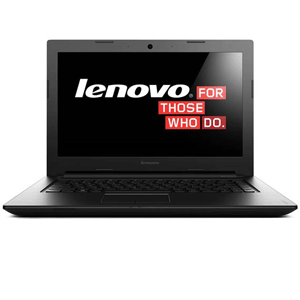
Lenovo G40-30 14-inch Intel Celeron Quad Core N2940/4GB/500GB/Windows 8.1 | VillMan Computers
Already has a quad-core processor and 4GB RAM, for the same price as a dual-core 2GB RAM laptop (13k). 14" screen makes for easier viewing than an 11" laptop, with a more ergonomic keyboard as well. Looks very boring, but all basic laptops look boring.
-
Verified Tsikot Member
- Join Date
- Oct 2006
- Posts
- 6,507
September 5th, 2016 10:55 AM #9Note on RAM and OS: If you want to use 64-bit OS, you really, really, really need at least 4GB of RAM. But if you stick with 32-bit then 2GB is ok, if not faster than 64-bit on 2GB. Originally Posted by jut703
-
Tsikoteer

- Join Date
- Oct 2009
- Posts
- 2,271
September 9th, 2016 02:31 PM #10mas maganda sana makuha mo ung naka separate ung video card sa mobo.or may slot siya na pwedeng lagyan ng video card
halos kasi lahat ng na encounter kong sira ng laptop video ang bumibigay..
-
Verified Tsikot Member
- Join Date
- Jul 2016
- Posts
- 18
September 10th, 2016 10:20 PM #11Get at least i3 processor, 2gb of memory enough na pang office / home use. Unless pang homework lang ng kids, the celeron will do. lenovo is ok. stay away with asus, manipis ang kaha. So far, sony vaio for me is the best next to apples, strong casing and decent specs for an 5 years old.
-
Darker and Bigger
- Join Date
- Oct 2002
- Posts
- 40,599
September 5th, 2016 10:57 AM #12Thanks jut punta also later Hillman Originally Posted by jut703
how about OS windows 8 vs 10?
Sent from my iPhone using Tapatalk
-
Dalek
- Join Date
- Dec 2006
- Posts
- 17,314
September 5th, 2016 12:33 PM #13Win 10 is better but 8.1 is liveable as well. Win 8 lang naman yung panget. Pwede mo tanong kung magkano upgrade to Win 10, minsan may promo offers eh. Originally Posted by shadow
Sent from my iPhone using Tapatalk
-
Darker and Bigger
- Join Date
- Oct 2002
- Posts
- 40,599
September 5th, 2016 12:46 PM #14How about other recommendations pa? I don't need the big screen actually Kasi permanently nakasaksak Naman sa monitor Kaya I'm looking at those 11 inches. Originally Posted by jut703
I was thinking mas Hinde clutter sa office table sa bahay kung maliit size
Sent from my iPhone using Tapatalk
-
Tsikoteer
- Join Date
- Aug 2003
- Posts
- 9,720
September 5th, 2016 01:06 PM #15Personal experience ko, 2GB is not adequate for Windows. Gumanda lang ang performance nitong gamit ko after i bumped it up to 4GB. If you can bump it up to 8GB for future proofing, even better -- Windows performance tends to be more memory- than CPU- bound.
Do you plan to lug it around sir, kaya 11in hanap nyo? i'm using a Dell Inspiron 11, very portable, but i find myself scrolling around too much when browsing. Kung around the house lang naman, a lightweight 13- or 14- inch is fine.
-
Dalek
- Join Date
- Dec 2006
- Posts
- 17,314
September 5th, 2016 01:32 PM #16Meron naman, dami options depende sa type mong brand. Acer, HP, Dell - lahat pare-pareho lang specs; dual-core Celeron, 2GB RAM, Windows 10. Originally Posted by shadow
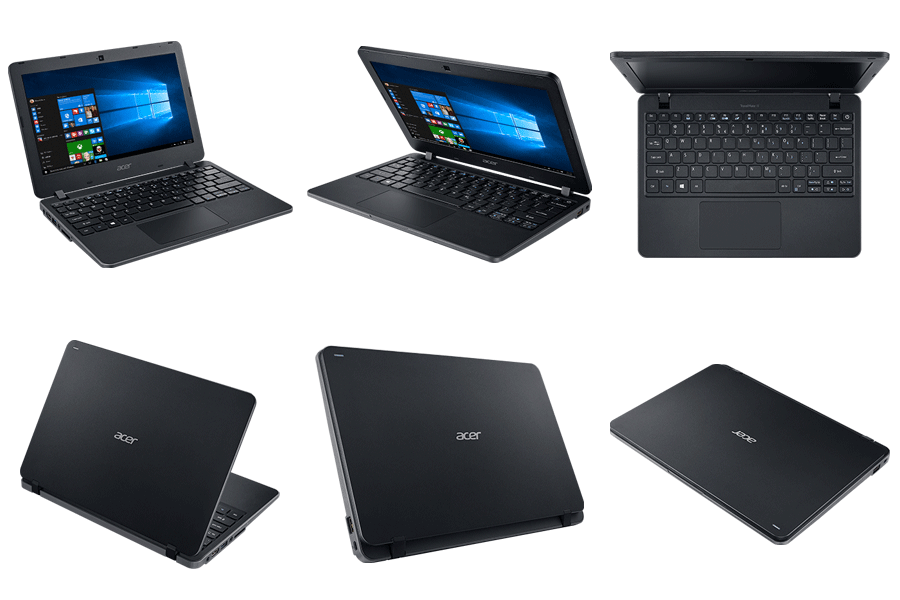
Acer TravelMate B117-M-C2RM 11.6-inch Intel Celeron N3160/2GB/500GB/Intel HD Graphics/Windows 10 | VillMan Computers - P15k
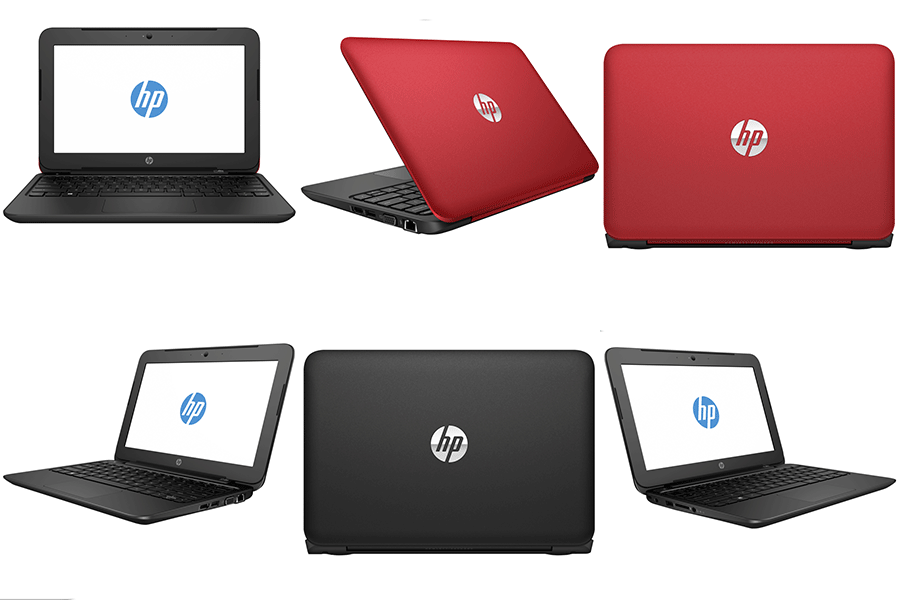
HP Notebook 11-F108TU Red/F107TU Black 11.6-in HD Intel Celeron N2840/2GB/500GB/Intel HD Graphics/Win10 | VillMan Computers - P12k
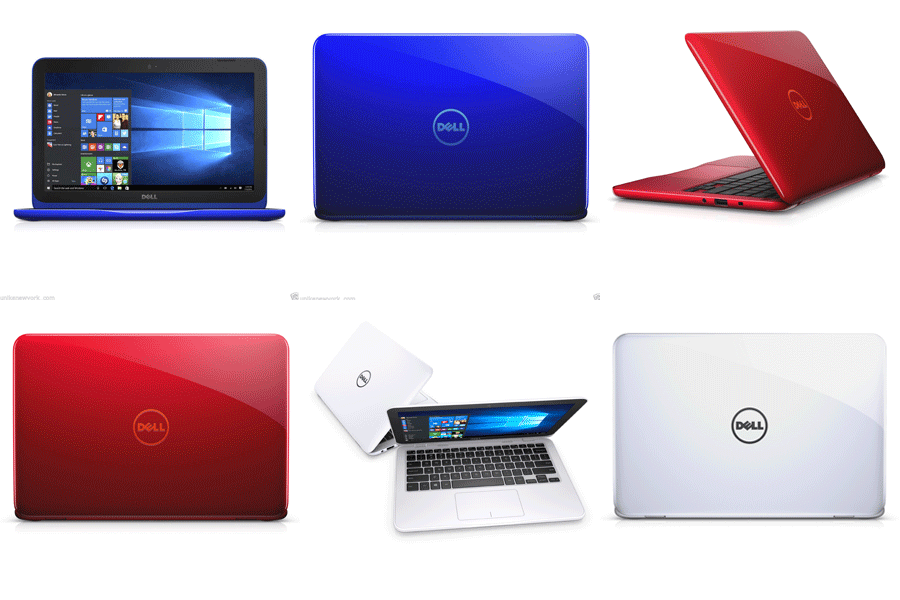
Dell Inspiron 11 3162 11.6-inch HD Intel Celeron N3050/2GB/500GB/Intel HD Graphics/Windows 10 | VillMan Computers - P14k
I'd get the HP (in red), kasi pinakamura and maayos naman tingnan. Second yung Dell. Last yung Acer, di ko talaga trip design ng kahit anong Acer tapos pinakamahal pa.
-
Verified Tsikot Member
- Join Date
- Aug 2015
- Posts
- 862
September 5th, 2016 07:15 AM #17One more thing kaya ako biased sa ibang OS kasi its also an added 'skill' at least you get to know another one aside from Win and/or Mac.
Sent from my SM-N9005 using Tapatalk
-
Verified Tsikot Member
- Join Date
- Jun 2015
- Posts
- 2,751
September 5th, 2016 11:01 AM #18^
I agree with this.
I got my wife one of these G series laptops for her online work about 2 to 3 years ago. Came with no OS, a core i5, dvd writer, usb 3 ports, and 500GB HDD. I just added 2GB RAM and installed win 7. Cost us about 25k iirc. Still works great to this day and she has no complaints.
Future proofing is good kasi for sure magbabago ang needs mo. Dati bumili kami ng netbook kasi inisip namin pang browse browse lang naman ng internet but then my wife ventured into working at home and the netbook just wouldn't cut it anymore. Napabili tuloy ng laptop.
G series are workhorses and not for eye candy.
Tapatalked
-
 High & Dry
- Join Date
- Jul 2007
- Posts
- 57,779
September 5th, 2016 11:06 AM #19I have a g series too. This is what was recommended to me here at the board. It's 3 yrs old now and I don't have problems naman except I had to replace the power cord (which is my fault). I got the free win 10 upgrade and I am very happy. I also bought mine at Villman.
-
Darker and Bigger
- Join Date
- Oct 2002
- Posts
- 40,599
September 5th, 2016 11:30 AM #20Ok lang sa akin itusra na lenovo kahit masagwa talaga. Dahil sa bahay lang Yan Hinde Naman dinadala
Sent from my iPhone using Tapatalk

 Reply With Quote
 Originally Posted by badkuk

