
What kind of back up system do you use for your PC?
Do you use external drives? Mirroring? Burning to CD/DVD?

The Largest Car Forum in the Philippines
- Forums
- Discussions
- Events
- Community
Results 1 to 18 of 18
-

 Tsikoteer

- Join Date
- Oct 2002
- Posts
- 29,354
April 13th, 2011 11:09 AM #1
-
Tsikoteer
- Join Date
- Oct 2002
- Posts
- 29,354
April 13th, 2011 11:11 AM #2Currently I am using a USB to SATA dock and internal SATA HDD as backup for my stuff at home.
At my office, my server has a daily data backup to USB flash drive (rotating between three flash drives) along with the server's HDD mirroring.
-
 Hoosier'ed Hotspur
- Join Date
- Dec 2005
- Posts
- 39,174
April 13th, 2011 11:45 AM #3
Personal files,- external drive.
Office Files (Emails, Reports, Studies et al) - IT takes care of it. However, I do my own backups on DVDs. There is a document retention policy in our office, though.
12.8K:toma:
-
 Photo/Videographer
- Join Date
- Sep 2007
- Posts
- 8,452
April 13th, 2011 12:02 PM #4I have one external drive for backing up my files. I plan to buy another one para exclusive lang sa mga photos ko
-
Tsikoteer
- Join Date
- Oct 2002
- Posts
- 29,354
April 13th, 2011 12:02 PM #5 Originally Posted by CVT

Your DVD backups are kept over a year? No issues with CD-rot?
-
Hoosier'ed Hotspur
- Join Date
- Dec 2005
- Posts
- 39,174
April 13th, 2011 12:04 PM #6I still have those DVDs since 3-4 years ago (office emails - against company policy... Originally Posted by ghosthunter
 )
)
The last time I checked them, which was early this year,- the files are still intact....
12.8K:toma:
-
Tsikoteer
- Join Date
- Oct 2002
- Posts
- 29,354
April 13th, 2011 12:28 PM #7How did you check your files? ... Did you just list them or did you actually opened them or tried copying them temporarily to another drive? Originally Posted by CVT
My defective CDs might show me the list of files/folders but fails to read/copy the actual file.
-
Hoosier'ed Hotspur
- Join Date
- Dec 2005
- Posts
- 39,174
April 13th, 2011 01:07 PM #8
I copied a couple to my hard disk. Then, added them to my Outlook Mails Folder, and opened them using Outlook. I still can read my old emails....
12.8K:toma:
-
 manginginom
- Join Date
- Jun 2005
- Posts
- 1,391
April 13th, 2011 02:00 PM #9i burn and verify files (mostly pics and videos) on taiyo yuden dvdrs. still good after a few years but also looking to add external hd, or just buy a bigger drive to add to my desktop.
-
 Tsikoteer
- Join Date
- Aug 2003
- Posts
- 3,273
-
 gentleman menyak
- Join Date
- Jul 2007
- Posts
- 733
April 13th, 2011 02:09 PM #11I have 2 NAS. My work and personal files are on a Synology DS111 which backups to a Dlink DNS 323. An external USB drive serves as another backup for more critical files which I can take with me.
-
Tsikot Member Rank 4
- Join Date
- Oct 2002
- Posts
- 2,719
April 13th, 2011 02:17 PM #12i have 250, 320 and 50 GB external USB-powered HD's ... all of them Freecom brand
250GB for photos
320GB for ebooks, software, etc
500GB for videos, normally used on WD Mediaplayer

-
Tsikoteer
- Join Date
- Nov 2009
- Posts
- 3,522
April 13th, 2011 03:14 PM #13I back also the hardware.. Using 2 laptops, 2desktop 500GB and 2TB HDD respectively.. Another PC used at home-theater with 500GB and 2TB HDD, dedicated for storing downloaded movies,****,music, pics and some not important media files..
 If the HDD expires, i just replace it then copy the files from the other hardware..
-
 Verified Tsikot Member
- Join Date
- Jul 2006
- Posts
- 172
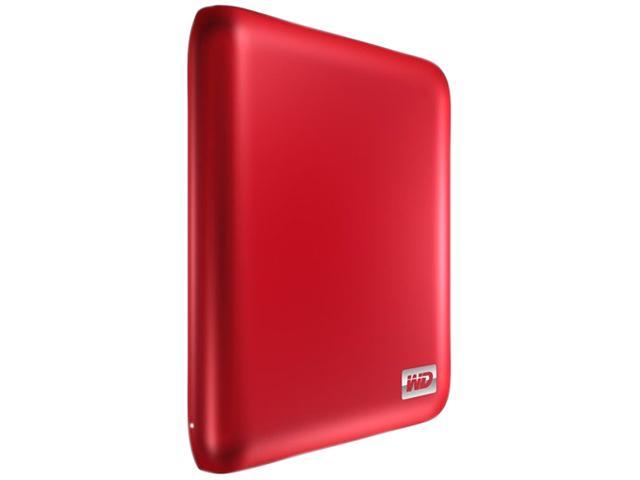
April 13th, 2011 08:02 PM #14I bought a few of these when I last went to the US.
Western Digital My Passport Essential SE 1TB Metallic Blue Portable External Hard Drive WDBACX0010BBL-NESN
- Form Factor: 2.5"
- Interface: USB 3.0
-
 Tsikot Member Rank 2
- Join Date
- Jan 2009
- Posts
- 6,452
-
BANNED BANNED BANNED
- Join Date
- Sep 2010
- Posts
- 420
-
Tsikot Member Rank 2
- Join Date
- Jan 2009
- Posts
- 6,452
April 14th, 2011 05:17 PM #17That's great if you're just working with file sizes up to a few MBs. But for bigger ones, it may not be as practical, given that bandwidth is still particularly expensive here. That and the proposed daily/monthly data volume capping by major telcos, coud hinder our direction towards cloud computing and storage. Originally Posted by hondaboot
I have a few essental files on Skydrive but that's it. I don't think I can use the cloud to backup a terrabyte or two worth of data. Not just yet anyway.
-
Tsikoteer
- Join Date
- Oct 2002
- Posts
- 29,354
April 14th, 2011 05:26 PM #18Trying uploading to the "Cloud" hundreds of high quality photos that range in size of 2MB to 5MB each as well as video that range in size of 150mb to 4gb. Originally Posted by hondaboot
Then later try accessing them on the limited bandwidth that the local ISPs are pushing with their "fair use" policy. You would be lucky if you get to access them at all.
And once you have uploaded all of that, how sure are you the Cloud service provider will not go belly up in the next year or so?

 Reply With Quote
 Originally Posted by CVT
